

Introduction to PowerShell for Unix People by Powershell.org - HTML preview
Download the book in PDF, ePub, Kindle for a complete version.
11. commands detail - h
head
The PowerShell equivalent of the *nix head is:

history
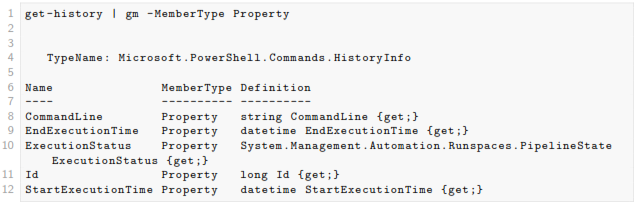
The Powershell equivalent of history is:

There is a built in alias history
It’s worth noting that history doesn’t persist across PowerShell sessions, although if you search online there are a couple of published techniques for making it persistent.
It’s also perhaps worth noting that Powershell gives you a couple of extra bits of information, if you want them:
history | egrep -i ls
There is no direct equivalent of the shell functionality you get with set -o vi sadly. You can up- and down- arrow by default, but if you want to search through your history then you need to do something like thishistory | select commandline | where-object {$_.commandline -like '*ls*'} | fl
You may also like...
-
Governed Data for AI Agents: 50 Practical Patterns Computer & Internet by GoalfyAIGoverned Data for AI Agents: 50 Practical Patterns
Reads:
18Pages:
54Published:
Aug 2026AI agents are only as reliable as the data context they receive. This practical field guide presents 50 concise patterns for shared definitions, metric govern...
Formats: PDF
-

Technical Product Management in the age of Artificial Intelligence Computer & Internet by Hamza MobeenTechnical Product Management in the age of Artificial Intelligence
Reads:
17Pages:
181Published:
Apr 2026Technical Product Management in the Age of AI is a practical guide for professionals looking to break into product management and build meaningful careers in ...
Formats: PDF
-

Web 3.0: Unleashing the Power of Decentralized Connectivity Computer & Internet by Michael McNaughtWeb 3.0: Unleashing the Power of Decentralized Connectivity
Reads:
49Pages:
42Published:
Jul 2025Web 3.0: Unleashing the Power of Decentralized Connectivity explores the future of the internet through decentralized technologies, blockchain, and user-first...
Formats: PDF, Epub, Kindle, TXT
-

Come, Let Me Tell You About The Crypto Election Project! Crypto & Blockchain by Michael McNaughtCome, Let Me Tell You About The Crypto Election Project!
Reads:
29Pages:
49Published:
Apr 2025Blockchain is one of the 21st century’s most transformative technologies—decentralized, transparent, and secure. Yet, it can feel complex at first. This book ...
Formats: PDF, Epub, Kindle, TXT