How to Enjoy and Profit from Pinteresting by Kristy Jenkins - HTML preview
PLEASE NOTE: This is an HTML preview only and some elements such as links or page numbers may be incorrect.
Download the book in PDF, ePub, Kindle for a complete version.
Download the book in PDF, ePub, Kindle for a complete version.
CHANGING YOUR ACCOUNT PREFERENCES
Just go to your profile image at the top of the page and mouse over your name. It will look like this:
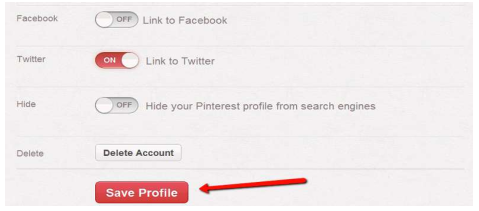
Settings tab allows you to change personal information such as your email address, password, about section, edit your image, change your location and add your website address.
Settings section is also where you can link your account to your Facebook timeline, twitter or hide your Pinterest profile from search engines. Always remember to click on the "Save Profile" button after you have made all the necessary changes.