

The Complete First Website Manual by Elliot Matthews - HTML preview
Download the book in PDF, ePub, Kindle for a complete version.
Updating your settings
Before you start changing the appearance of your website, you should consider changing a few of the settings of your website.
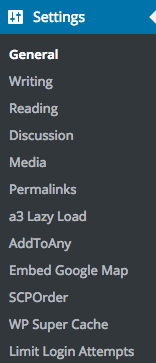
General – change the Site Title and Tagline, your date and time preferences, default membership status for visitors and website language.
Writing – change the default post category, post format and link category.
Reading – choose what is posted on your front page, how many posts to show at once as well as showing the full text or just a summary for your blog posts.
Discussion – manage settings for comments and new users.
Media – set the default size for image uploads and default upload path (you shouldn’t have to change this)
Permalinks – change the default settings for new posts. A permalink is the permanent link address for that post such as
www.mywebsite.com/article/permalink. You can leave this how it is for now.
A3 Lazy Load – enable Lazy Load under Lazy Load Activation.
WP Super Cache – select Caching On (Recommended).