

Quick Guide to Local Service Ads: For Local Home Service Professionals by Will Troup - HTML preview
Download the book in PDF, ePub, Kindle for a complete version.
QUICK GUIDE TO LOCAL SERVICE ADS
For Local Home Service Professionals
Are you tired of wasting money on ads that don't bring in real customers? Are you
ready to discover the secret weapon that successful local home service
businesses are using to dominate their market? Look no further!
Quick Guide to Local Service Ads For Local Home Service Professionals is your ticket to mastering the most powerful tool for attracting high-quality leads right when they need your services the most. Imagine getting connected directly with
homeowners searching for your exact services, all while only paying for genuine
customer interactions. This is not some far-fetched marketing gimmick—it's the proven power of Google Local Service Ads (LSA).
Inside this no-fluff, high-impact guide, you'll uncover:
● How to Set Up Your LSA Account for Maximum Exposure: A step-by-step walkthrough that even your tech-averse friend could follow.
● Lead Marking Mastery: Learn the secrets of managing your leads effectively to get more calls and keep your ad costs down.
● Budget and Bidding Strategies: Stop throwing money at ads that don’t work.
Instead, learn how to make every dollar count, driving more business for less.
● Real-World Success Tips: Discover the strategies that have helped countless home service businesses skyrocket their LSA leads by over 500%.
By Will Troup, Founder of LocalSink
Benefits of Using Google Local Service Ads (LSA) for Your Home Service Business ........ 4
Account Access ...................................................................................................................... 34
Local Service Ads
Unlock More Opportunities for Your Home Service Business with Google Local Service Ads (LSA)!
In today’s fast-paced world, standing out and attracting new customers is more important than ever for your home service business. That’s where Google Local Service Ads come in—a powerful and affordable way to connect with people who need your services right now!
Benefits of Using Google Local Service Ads (LSA)
for Your Home Service Business
Direct Access to High-Quality Leads
Google Local Service Ads connect you directly with potential customers actively searching for the services you offer in your area. This means you're reaching people who are ready to hire, ensuring that your business is seen by the right audience at the right time. By appearing at the top of Google search results, you increase your visibility and attract more qualified leads, leading to higher conversion rates.
Pay for Results, Not Clicks
With LSA, you only pay when a potential customer contacts you directly through the ad—either by calling or messaging your business. This performance-based model means you’re not wasting money on clicks that don’t convert into real business opportunities. Every dol ar spent is tied to actual customer interactions, making LSA a cost-effective marketing tool for your home service business.
Enhanced Trust with Google Guaranteed Badge
LSA allows you to earn the Google Guaranteed Badge, a mark of trust and reliability. This badge shows potential customers that your business has been thoroughly vetted by Google, which can significantly increase their confidence in choosing your services over competitors.
Businesses with the Google Guaranteed Badge often see higher click-through rates and increased bookings, as customers prefer to work with verified professionals.
Easy-to-Use Dashboard for Lead Management
The LSA platform includes a user-friendly dashboard where you can manage all your leads in one place. This feature simplifies your workflow, allowing you to see at a glance which leads have contacted you, booked a service, or require follow-up. It also includes tools for tracking performance, managing budgets, and disputing invalid leads, making it easy to stay on top of your advertising efforts.
Boosted Local SEO Performance
Appearing in Local Service Ads can also boost your local search engine optimization (SEO) efforts. As your business gains more visibility through LSA, you may also notice an increase in
organic search traffic. This is because customers who see your business at the top of search results are more likely to click through to your website, enhancing your overall online presence.
Increased Customer Reviews and Credibility
LSA encourages satisfied customers to leave Google Verified Reviews, which are highly trusted by other potential clients. These reviews are directly linked to jobs booked through LSA, providing a reliable measure of your business’s quality and customer satisfaction. Accumulating positive reviews not only boosts your credibility but also enhances your visibility and ranking in search results.
But don’t just take my word for it—I’ve seen firsthand how powerful LSA can be. By using the strategies outlined in this guide, I’ve helped my clients increase their LSA leads by over 500%! That’s right—500% more leads, simply by setting up their accounts correctly, optimizing their ad strategies, and ensuring they stand out with the Google Guaranteed Badge. This kind of growth isn’t just a possibility; it’s a reality, and I’m here to help you achieve the same success.
Before you dive into setting up your Google Local Service Ads, make sure to check if you’re eligible for the Google Guaranteed Badge. It’s a great way to build trust with potential customers and show them that your business is reliable and verified by Google.
ELIGIBLE HOME SERVICES
● Appliance Repair
● Carpenter
● Carpet Cleaning
● Countertop Pro
● Drain Expert
● Electrician
● Fencing Pro
● Flooring Pro
● Foundation Pro
● Garage door
● General Contractor
● Handyman
● Home Inspector
● Home Insulation
● Home Security
● Home Theater
● House Cleaning
● HVAC
●
Junk Removal
● Landscaper
● Lawn Care
● Locksmith
● Moving Services
● Painter
● Pest control
● Plumber
● Pool Cleaning
● Pool Contractor
● Roofing
● Sewage System
● Siding Pro
● Snow removal
● Tree services
● Water Damage Restoration
● Window Cleaning
● Window Repair
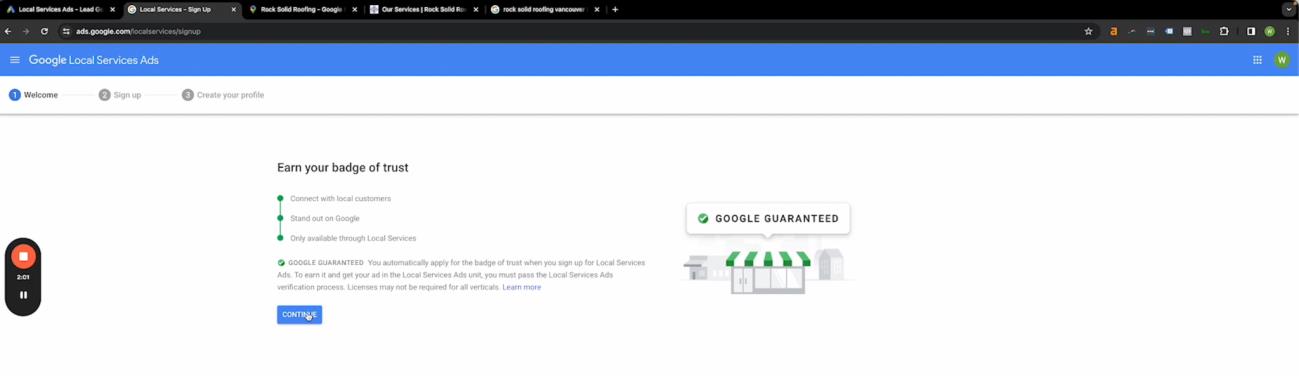
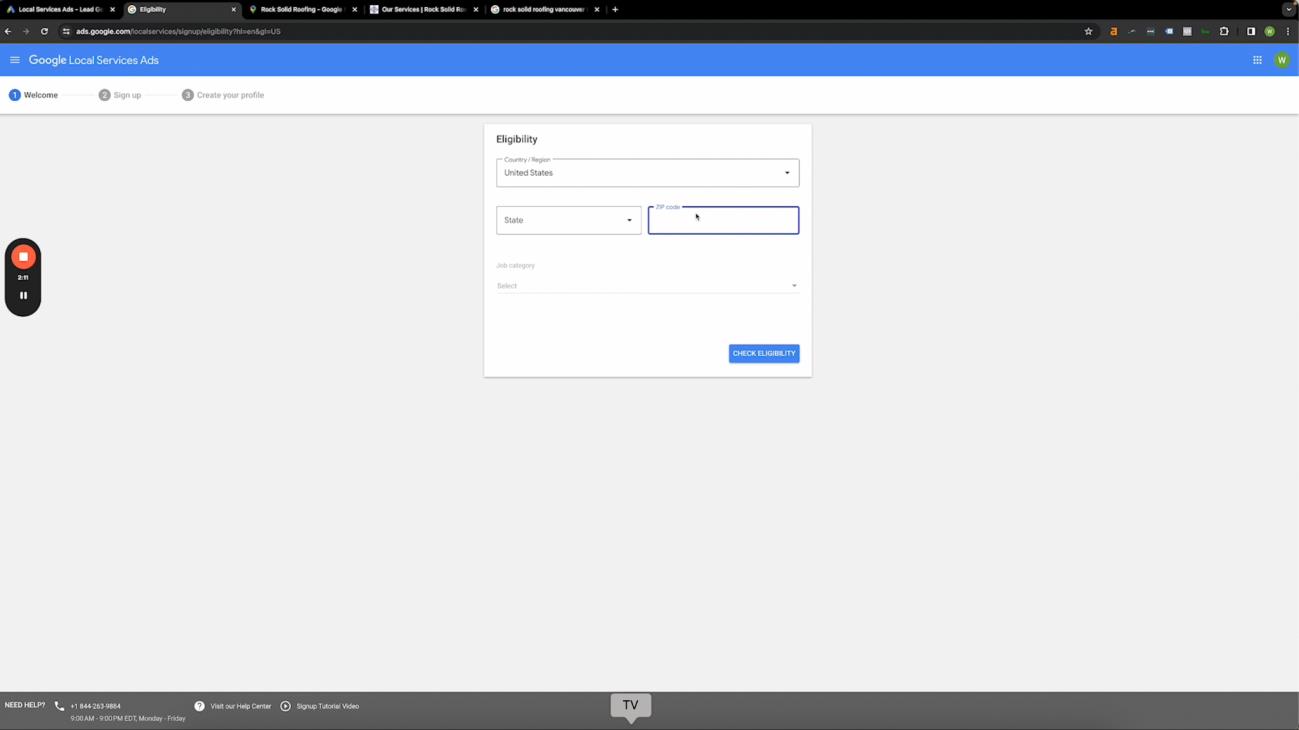
Signing Up for Local Service Ads
Go to ads.google.com/localservices/signup and click “Continue”
Type in your Country or Region, State, ZIP code, and Job Category. Once that’s done, click the blue “Check Eligibility” button.
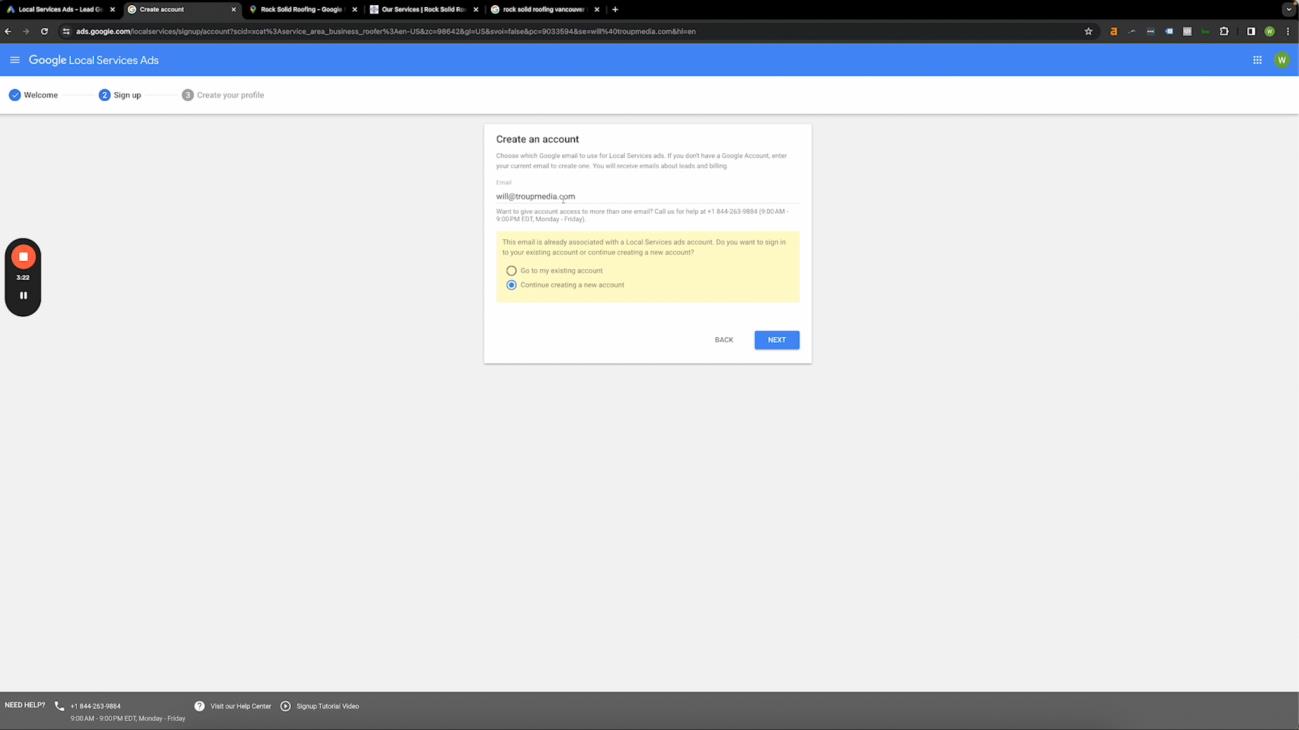
Type in your email and click “Next.”
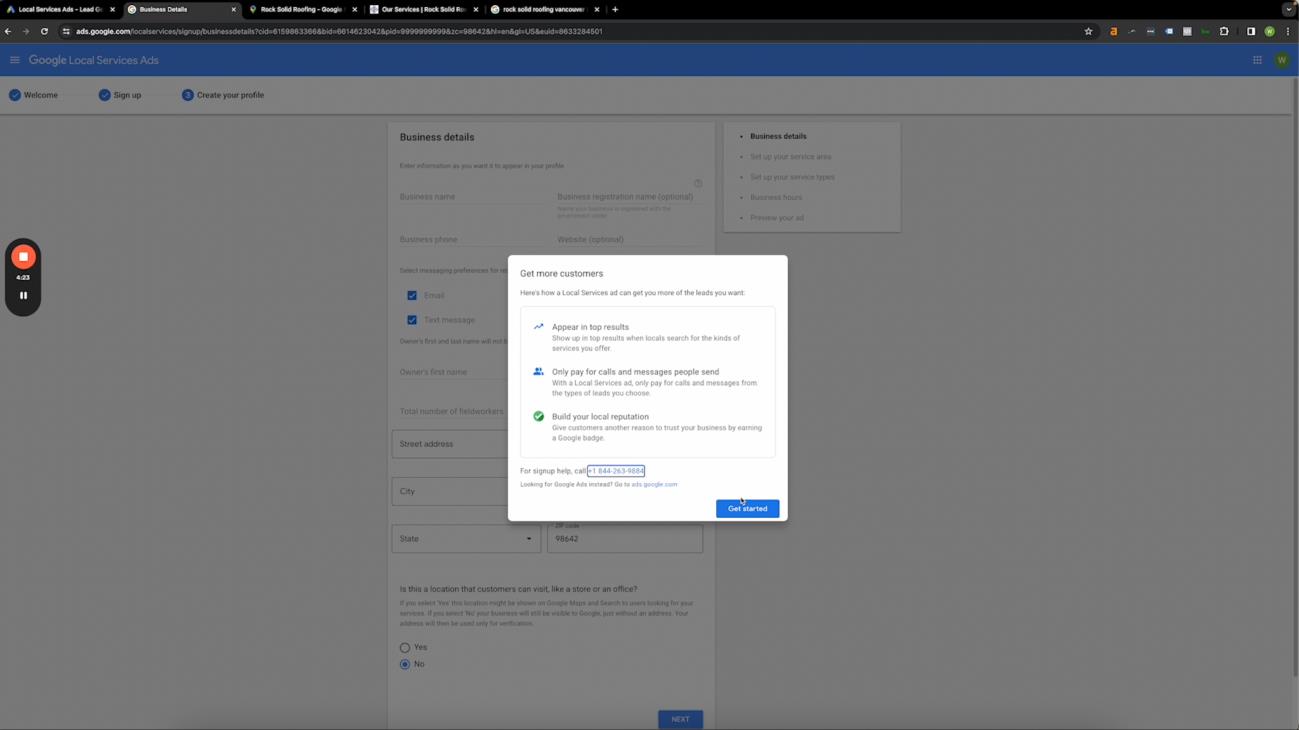
You will then be asked for the business details seen below. The following information will be needed:
● Business name
● Business registration name (optional)
● Business phone
● Website (optional)
● Messaging preferences for receiving leads (email or text)
● Owner’s first and last name
● Total Number of Fieldworkers*
● Year Founded
● Address (Street, City, State, ZIP code) and
● A confirmation if physical address is available**
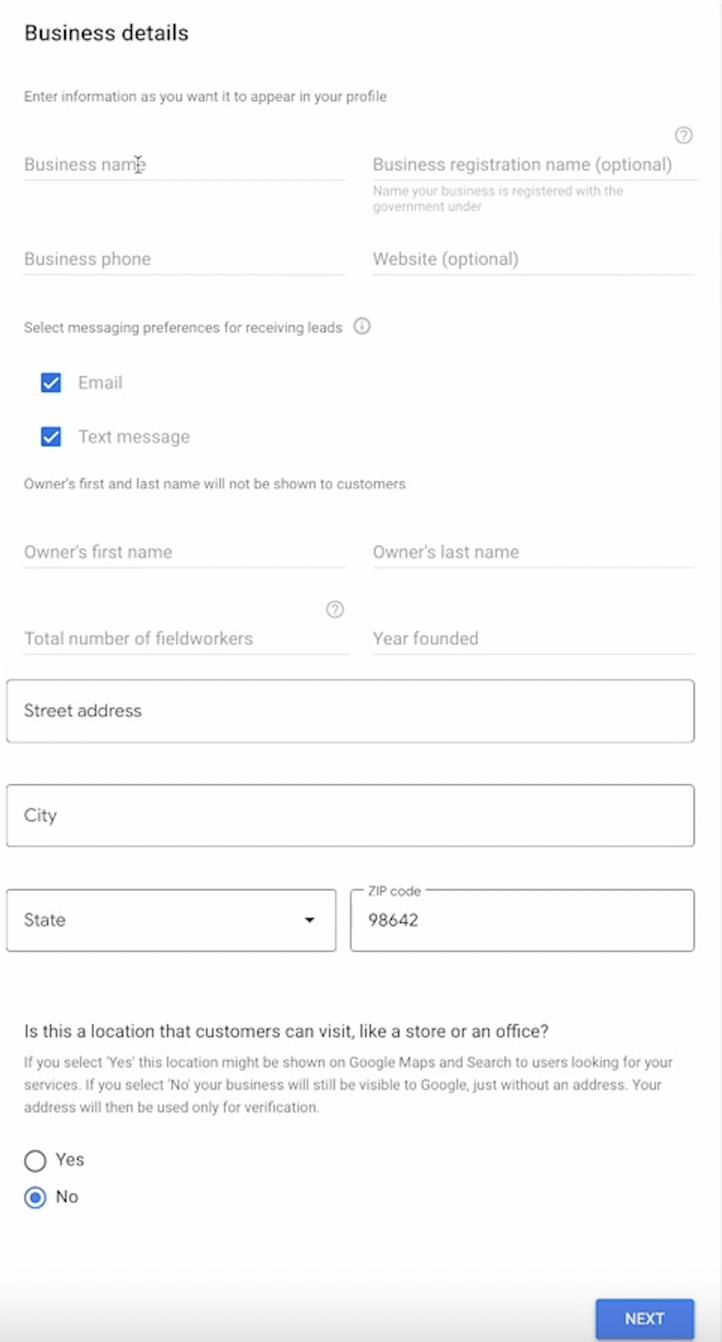
Ensure that everything is accurate.
*Fieldworkers - anyone that goes into customers houses and has contact with customers. If someone's in the office answering phone calls and never goes to customers' homes, you don't need to include them in this.
**If you're using a virtual office, select no when they ask if this is a place customers can visit, but if it's an office customers can visit, then hit yes.
You now have access to the Local Service Ads Dashboard!
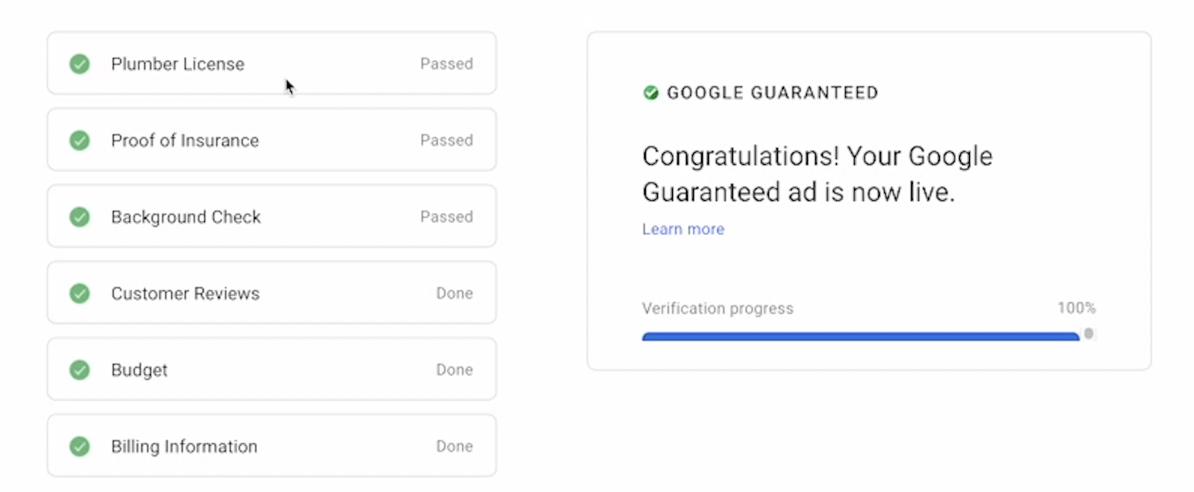
Business Verification
After you complete the initial signup process, you'll be directed to a page that looks like this: The following information is needed for verification:
● License Number
Enter your license number here. This could be your plumber's license, roofer's license, or any other relevant credential you hold. Once entered, you'll be prompted to verify your license.
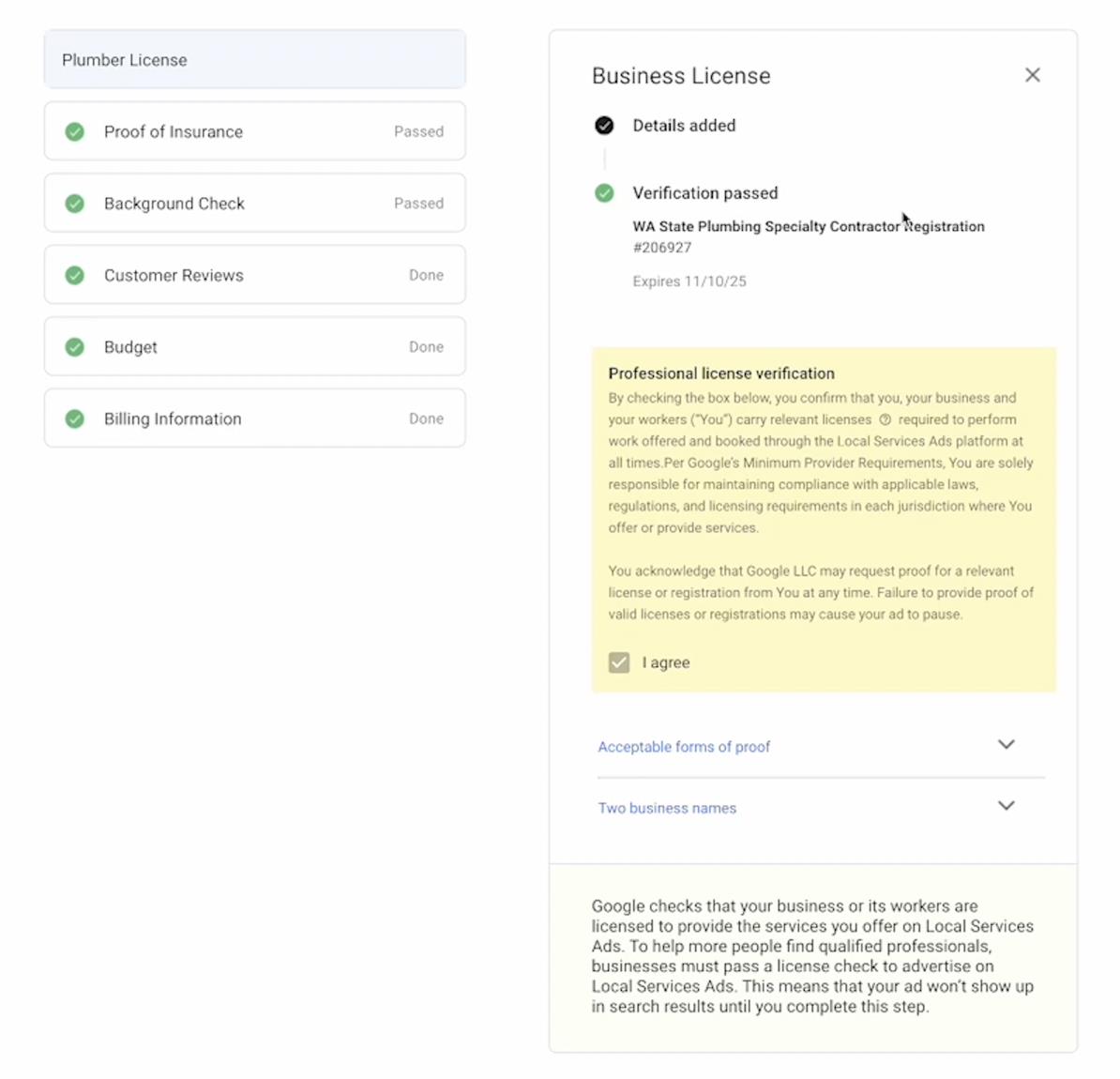
● Proof of Insurance
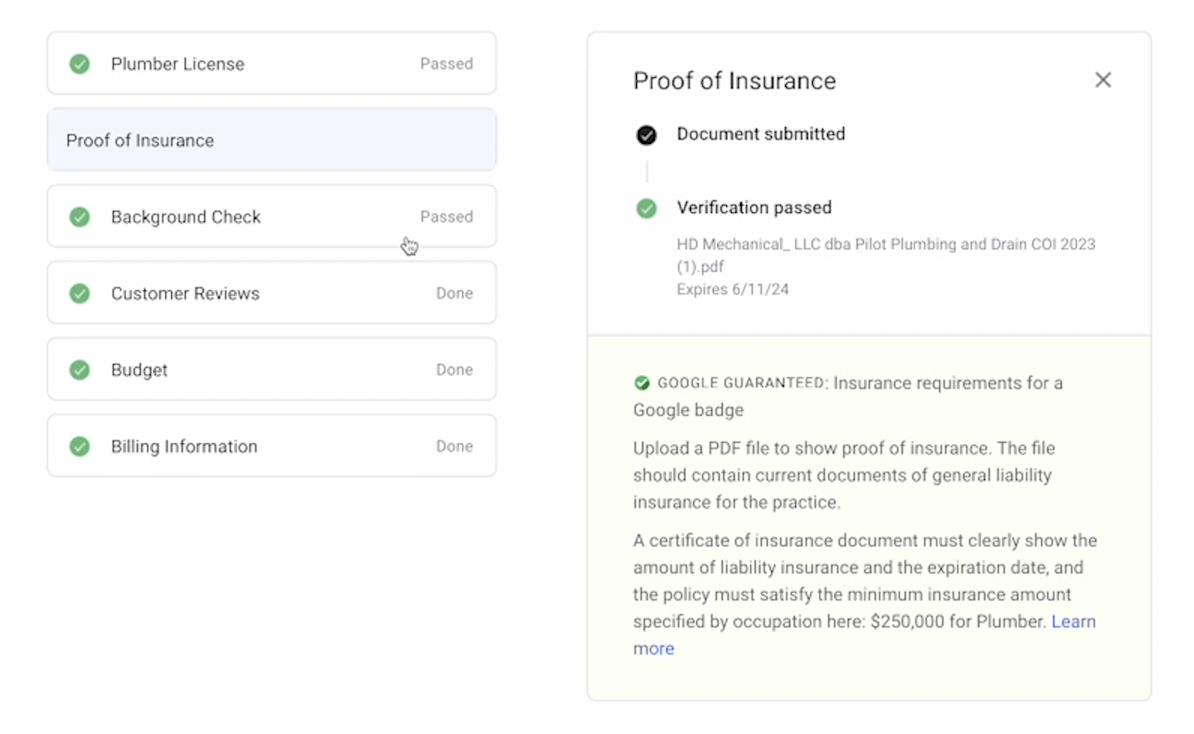
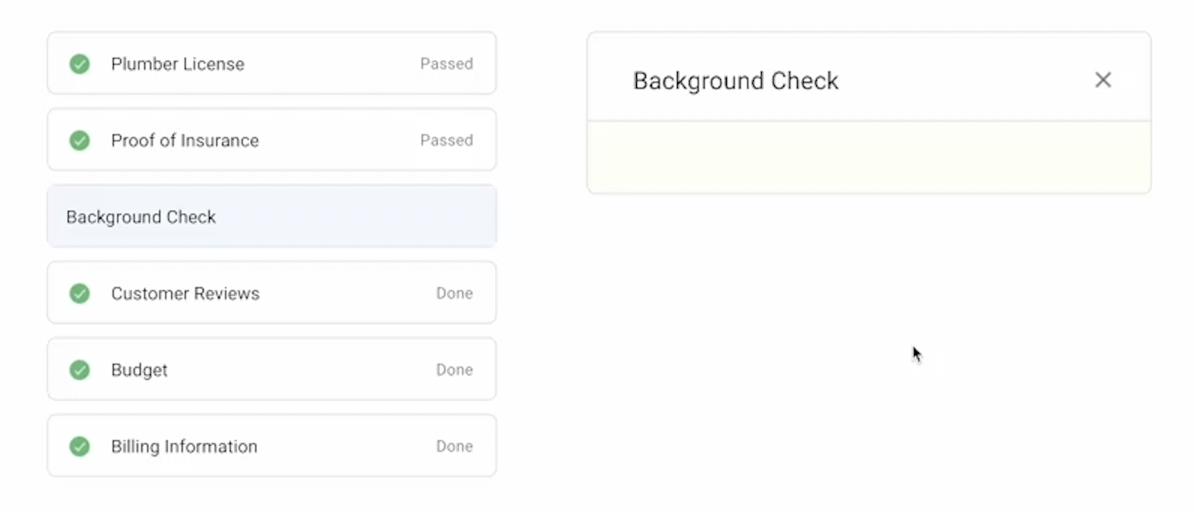
Upload a PDF file to show proof of insurance. The file should contain current documents of general liability insurance for the practice showing the amount, expiration date, and the policy must satisfy the minimum insurance amount specified by occupation.
● Background Check
This is going to take you to a separate platform where you will enter the emails of all of your field workers and for every person that works at your company that is going into customer homes. Again, this doesn't have to be Like CSRs or people that are just in the office. This is customer facing workers.
*PS - we’ve had success with just adding one email/name for the Evident background check.
Try just adding your name & email for less headache.
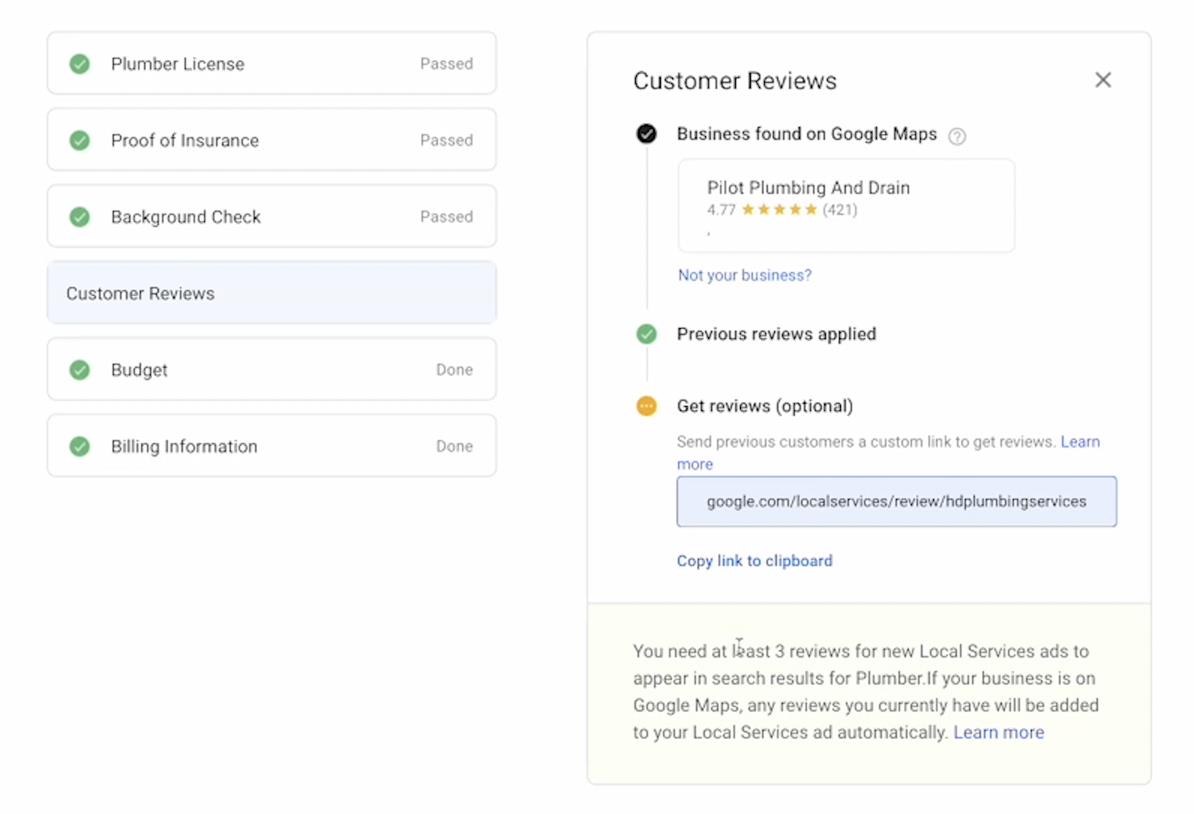
● Customer Reviews
You need at least three reviews for local service ads so make sure that you have three reviews on your Google business profile. If you don't, I would highly recommend just reaching out to previous clients and calling them and saying, “Hey, it would mean a lot if you could write a five star review.” It'l only take two minutes of your time.
Make sure you have the link ready to send to their email. That's a quick way to get three reviews off the bat if you don't already have it. Most of the clients we work with have more than three reviews already, but if they don't, just make sure you get those.
● Budget
Set a flexible price between $500 and $2000 to get started. This will help you land your first few clients without going too low or too high.
● Billing Information
If you want to get the most out of your Local Service Ads, properly marking your leads within the LSA dashboard is key. It’s all about optimizing your campaign performance to generate more calls from potential customers.
Frequency of Lead Marking
Leads within the LSA dashboard should be marked consistently, ideally on a daily basis. Heck-you could do it on an hourly basis if you’re ambitious. Google wil send you more leads at a lower cost.
Helping Your Team Understand the Importance of Lead Marking When introducing CSRs who are unfamiliar with Local Service Ads (LSA), it's essential to explain why lead marking is crucial and how it affects LSA performance. Here’s how you can effectively communicate this to your team:
● Training: During your training, make sure to cover the significance of lead marking.
Even better, just send them this guide!
Consequences of Not Marking Leads
Failing to mark leads can negatively impact LSA performance in multiple ways:
● You will get less leads
● You will pay more for leads
● Your LSA account will be “shadow-banned” until resolved
Outcome of Consistent Lead Marking
By consistently marking leads, your Local Service Ads account will experience:
● Increased call volume
● Lower Costs
As a local home service business owner, properly marking your leads is key. When you take the time to consistently and accurately mark your leads, you're helping Google understand what types of customers are most valuable to your business.
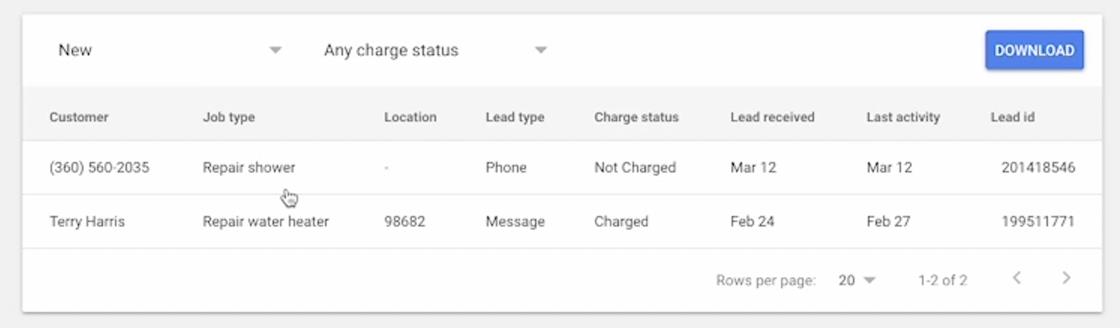
This accurate lead marking helps Google optimize your ad placement, meaning your ads are shown to the right people at the right time. The result? More calls from potential customers who are actively searching for your services.
On top of that, properly marked leads can lead to lower costs per lead. By demonstrating to Google that you're effectively managing your leads and targeting the right audience, you'll find that your ads become more efficient, driving more calls at a lower price. And, because Google rewards businesses that maintain high-quality lead management practices, you’l stay at the top of Google Search, keeping your business visible and competitive.
To sum things up, if you mark leads the right way, every dollar you spend on LSA is working as hard as it can to bring you new customers and grow your business.
How to Mark Leads
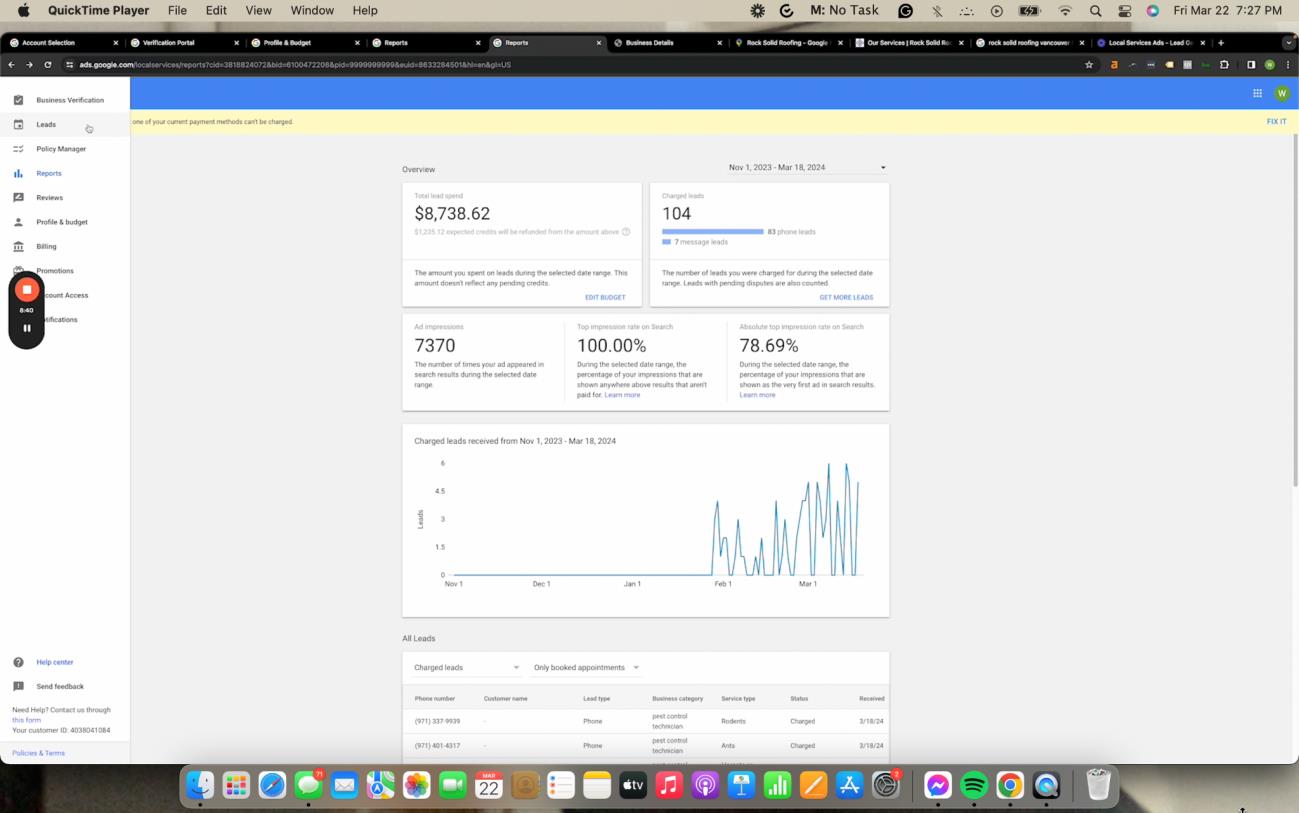
On the left side of the dashboard, go to “Leads”
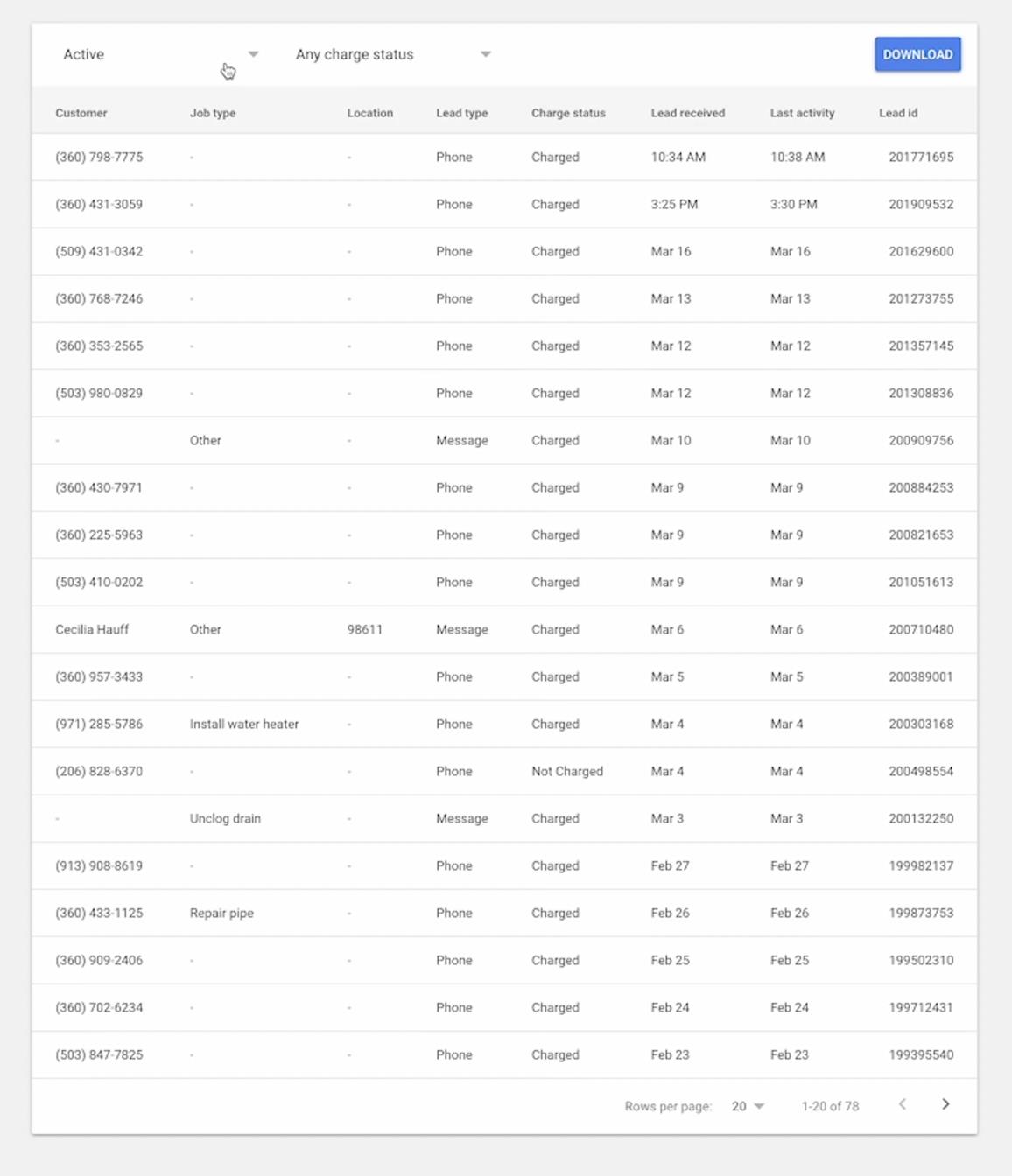
And unmarked leads in the “Active” column. The current presence of a significant number of unprocessed leads within the LSA dashboard indicates a potential decline in future lead generation. Addressing this backlog is essential to maintain optimal campaign performance.
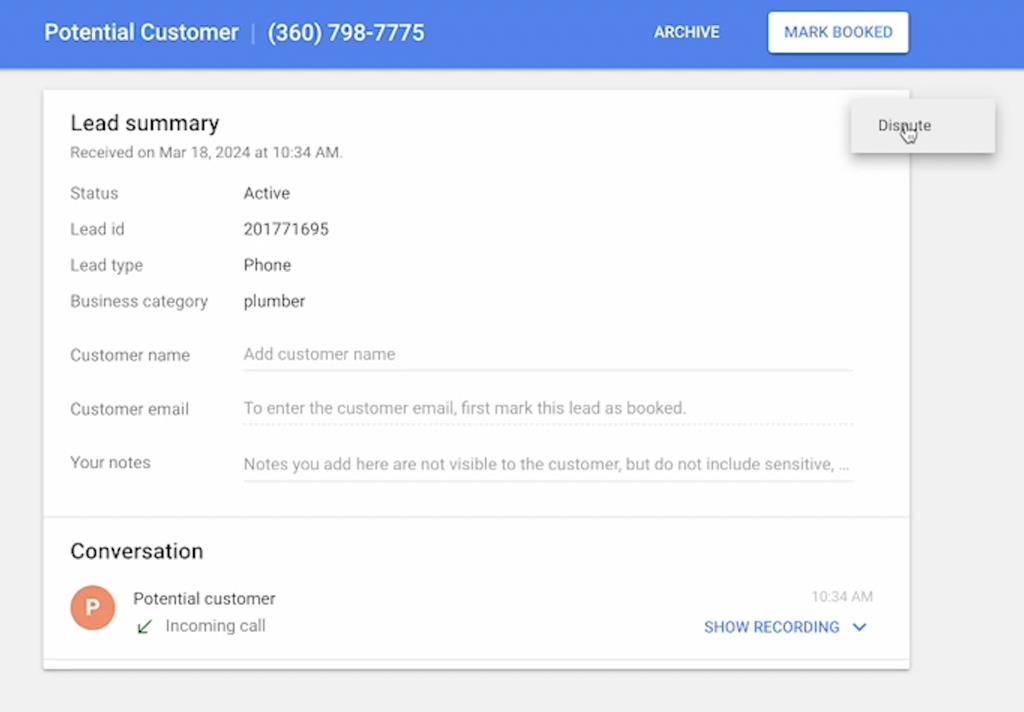
Let’s take a look at one of the unmarked leads.
1. There are three primary ways to mark a lead within the LSA dashboard:
● Booked: Select this option if the lead resulted in a booked job for your service.
● Archived: This option is appropriate if the lead did not convert into a job but does not qualify for a dispute (e.g., customer inquired about a service not offered).
● Disputed: Choose this option if the lead does not fall within your service parameters or if there was a legitimate reason why you couldn't service the customer.
Disputing Leads
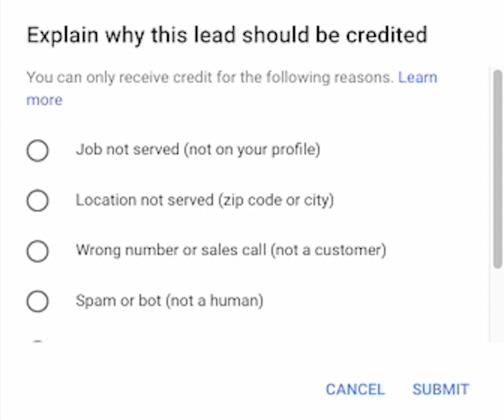
Leads can be disputed for various reasons, including:
● Service not offered: The lead inquired about a service not listed on your LSA profile.
● Location not served: The lead originated from a location outside your designated service area.
● Incorrect contact information: The lead contained a wrong phone number or appeared to be a sales call, spam, or bot.
● Duplicate lead: The lead is a duplicate of a previously received inquiry.
● Incorrect business: The lead was intended for a different business.
A pop-up will appear and you can choose the option that is best for the situation.
Deciding When to Dispute Leads
● New LSA Accounts: For accounts in the initial growth stage, consider marking leads as
"Booked" or "Archived" even if they don't perfectly align with your services. This helps Google's algorithm gather data and optimize future lead quality.
● Established LSA Accounts: Once your account is established and receiving a consistent flow of qualified leads, prioritize disputing irrelevant leads to avoid unnecessary costs and maintain optimal campaign performance.
LSA Profile Set-up - Profile and Budget
Phone Number Selection
The Google Local Service Ads (LSA) profile allows you to specify the phone number that will be displayed on the ad and receive incoming calls from potential customers. Here's a breakdown of key considerations:
● Flexibility: You are not required to use your primary business phone number for LSA ads.
● Tracking Recommendations: It's highly recommended to utilize a trackable phone number for LSA leads. This allows for:
● Call Attribution: Distinguishing LSA calls from other marketing sources within your Customer Relationship Management (CRM) system.
● Campaign Analysis: Tracking the performance of your LSA campaign based on call volume and conversion rates.
● Compatible Tracking Services: LSA integrates seamlessly with various call tracking services like CallRail. Choose a service that integrates with your preferred CRM for optimal data analysis.
Implementation Steps
1. Access your LSA dashboard and navigate to the profile settings section.
2. Locate the designated field for entering the phone number.
3. Input your desired phone number, be it your business line or a dedicated tracking number.
4. Save your profile settings to confirm the phone number selection.
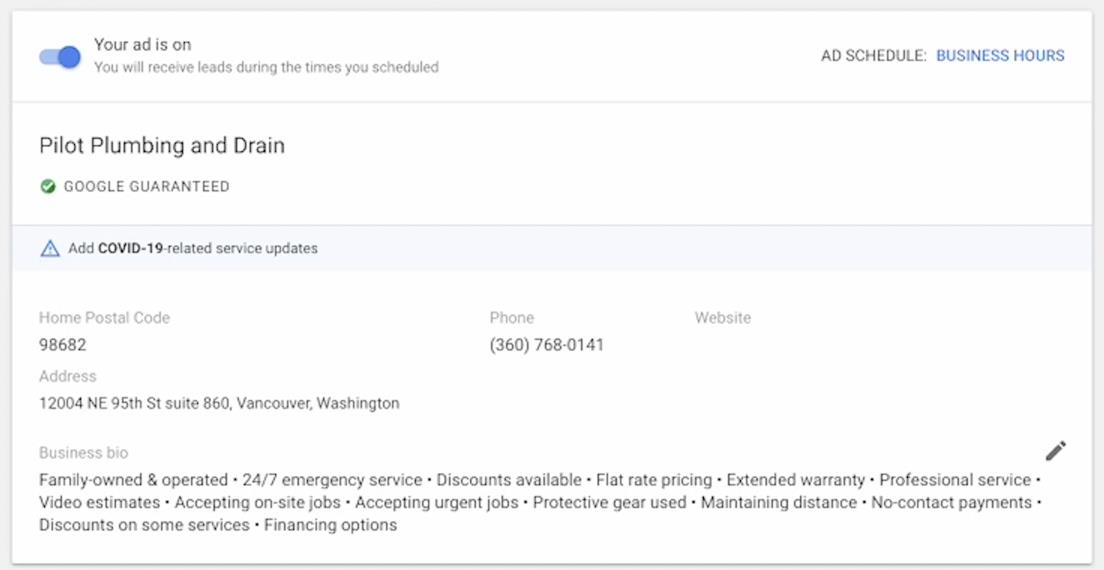
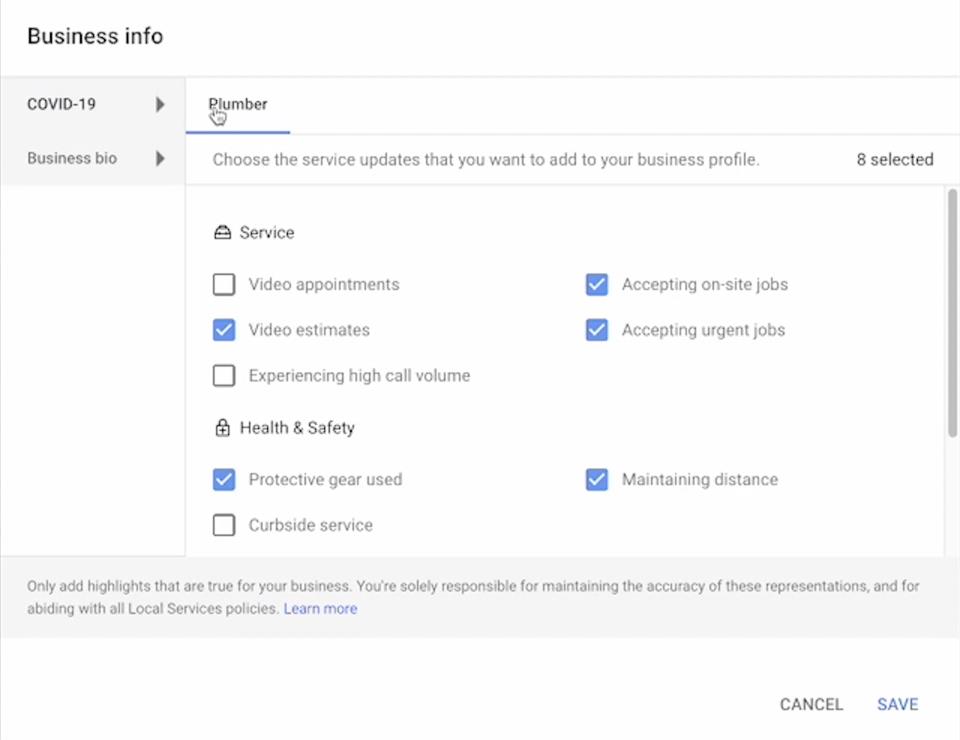
Business Info
COVID-19
When establishing a profile for COVID-19 related services, ensure all applicable options are selected with the utmost accuracy.
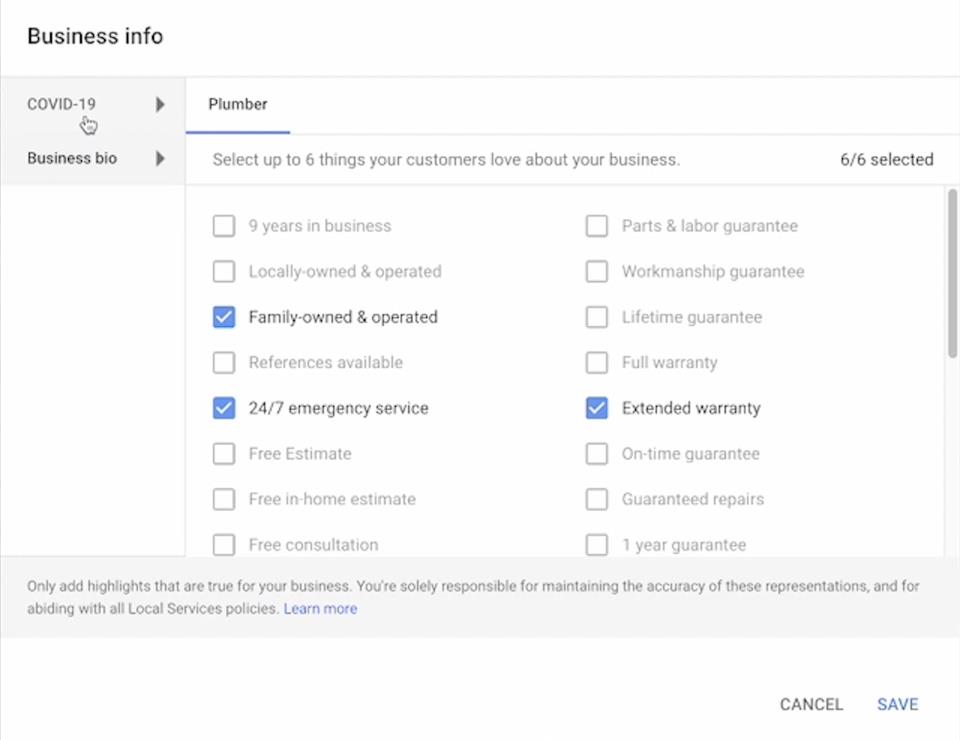
Business Bio
Prioritize Key Service Attributes: While reviewing service attributes, prioritize selecting the most relevant options for your business. These include 24/7 emergency service, extended warranty, professional service discounts, and flat rate pricing. Ensure all six of these options are accurately reflected in your profile.
Budget
Bidding Strategy
Google Local Service Ads (LSA) offers two primary bidding options:
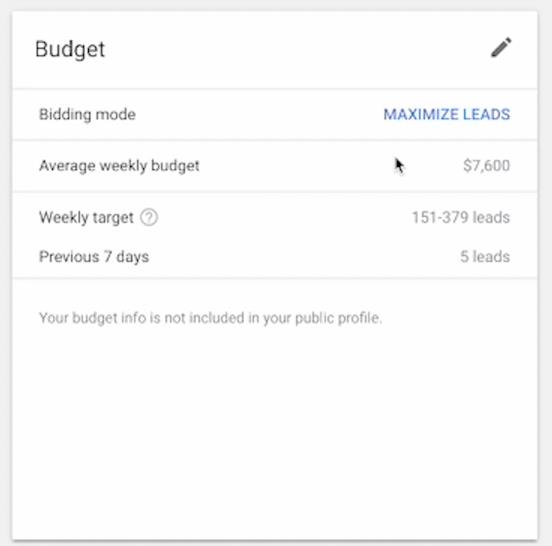
● Maximize Leads Bidding: This automated bidding strategy prioritizes maximizing the number of leads generated within your designated weekly budget. It's generally recommended for established businesses seeking to optimize lead volume.
● Manual Bidding (Optional): For experienced users, LSA also provides the option to manually set a maximum bid per lead. This approach requires careful monitoring and adjustments based on campaign performance data.
Budget Allocation
For accounts utilizing the "Maximize Leads" bidding strategy, the following budget allocation recommendation applies:
● Target Budget: Set your weekly budget to three times your historical average weekly spend on LSA campaigns. This approach demonstrates your willingness to invest in acquiring more leads and allows the algorithm to optimize lead generation within your budget constraints.
Setting a higher budget signifies your commitment to receiving more leads. This, coupled with consistent lead marking and adherence to best practices, fosters continuous campaign growth.
Regularly monitor your campaign performance and budget utilization. If you're not receiving an adequate number of leads, consider slight adjustments to your budget allocation within the
"Maximize Leads" bidding strategy.
Effective LSA campaign management necessitates a well-defined budget strategy. By following these guidelines, you can ensure optimal lead generation while maintaining control over your LSA campaign expenditure.
Job Type Selection
Selecting Relevant Job Types
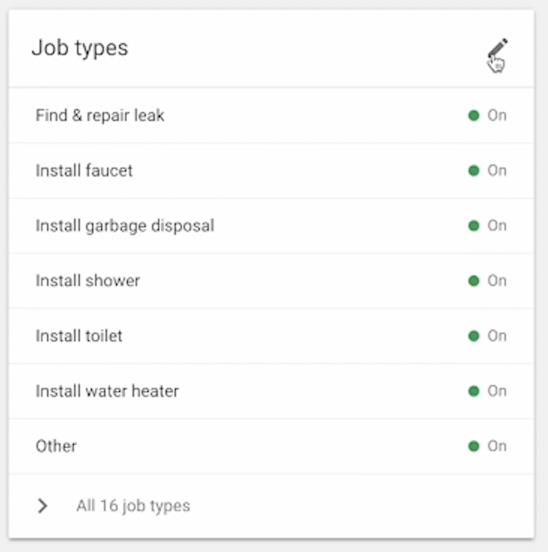
The Google Local Service Ads (LSA) platform allows you to specify the specific job types your business offers. This ensures potential customers searching for those services see your ad.
Here's how to approach job type selection:
● Accuracy is Key: Select only the job types your business genuinely offers and has the capacity to service.
● The "Other" Option: This option can capture inquiries outside your listed services.
However, it can also lead to irrelevant calls.
Balancing Lead Volume and Relevance
● Leaving "Other" Checked: This may result in a higher volume of calls, but some may be irrelevant to your core services. Carefully review these leads to determine their validity.
● Unchecking "Other": This can decrease the overall number of calls, but it increases the likelihood of receiving inquiries directly related to your listed services.
Tailoring to Client Needs
The decision to keep "Other" checked should be made on a case-by-case basis, considering the client's priorities.
● Higher Lead Volume: If a client prioritizes maximizing lead volume, keeping "Other"
checked might be suitable, even if it includes irrelevant inquiries.
● Improved Call Relevance: Clients prioritizing receiving highly relevant calls might benefit from unchecking "Other," even if it means potentially missing out on some leads.
A strategic approach to job type selection is crucial for optimizing LSA campaigns. Carefully consider the trade-off between lead volume and call relevance, and tailor your choices to each client's specific needs.
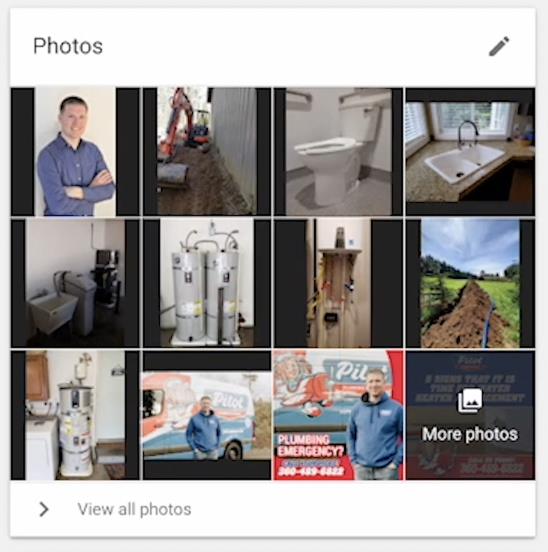
Photos
Quality and Quantity
Including high-quality images within your Google Local Service Ads (LSA) profile significantly enhances campaign performance. Visuals play a crucial role in attracting potential customers and establishing trust.
Filling as many image slots as possible within each category is recommended. Google's algorithm may favor profiles with a wider range of visuals, even if individual images aren't perfect.
While absolute professional photography isn't required, prioritize well-lit and clear images that accurately portray your business. Modern smartphones generally capture adequate image quality for LSA purposes.
Image Content Recommendations
Variety is Key: Showcase your business through a diverse range of images across several categories:
● Logos: Include your company logo for brand recognition.
● Company Vehicles: Feature branded vehicles like vans or trucks to demonstrate professionalism.
● Project Photos: Include high-quality images of completed projects to visually represent your services. Consider showcasing before-and-after photos to highlight the impact of your work.
● Workplace Images: Provide photos of your office or work environment to give potential customers a glimpse into your operations.
● Team Photos: Incorporate friendly and professional team photos to personalize your profile and build trust with potential customers.
Investing time and effort into creating a visually appealing LSA profile with a diverse range of high-quality images is a powerful strategy to boost campaign performance and attract more qualified leads.
Service Areas
Defining Service Areas
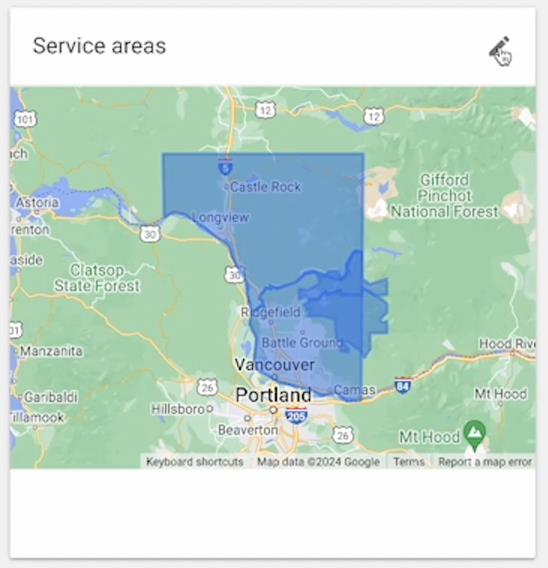
The Google Local Service Ads (LSA) platform allows you to specify the geographic areas where you're willing to provide service. Here's a breakdown of key actions:
● Include Target Service Areas: Clearly identify all locations where your business operates and is prepared to service customers.
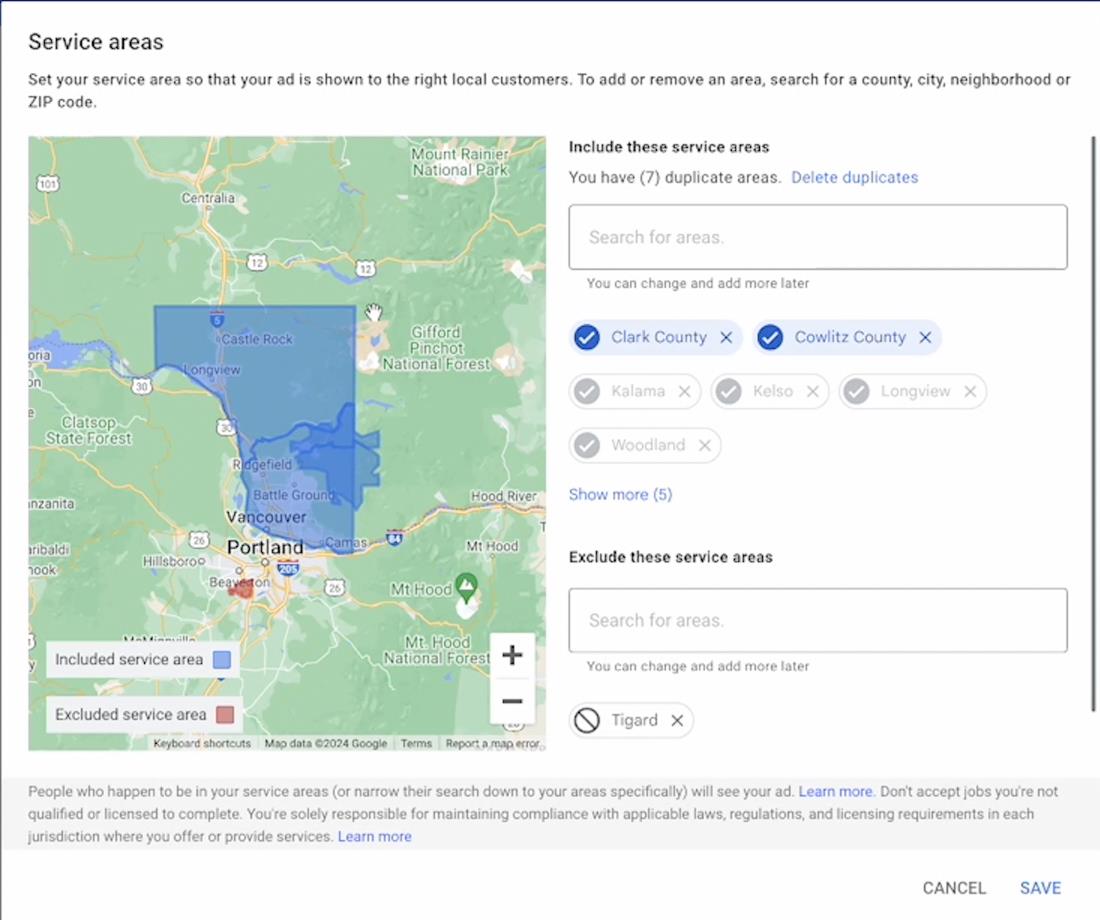
● Exclude Unwanted Service Areas: Utilize the exclusion feature to prevent calls originating from areas outside your operational reach. For example, if you don't service Tigard, add it to the exclusion list.
Monitoring and Adjustments
● Identify Out-of-Area Calls: Review call logs to identify instances where calls originated from excluded areas.
● Dispute Out-of-Area Calls: While LSA may occasionally generate leads from excluded areas, you can dispute these occurrences for potential refunds.
● Proactive Management: If you anticipate receiving calls from specific unwanted areas, pre-emptively add them to the exclusion list before receiving irrelevant leads.
Establishing clear service areas within your LSA profile is crucial for optimizing campaign performance and avoiding unnecessary costs from leads outside your operational range.
Regularly monitor call logs and proactively manage your exclusion list to ensure you're only receiving leads from your desired service locations.
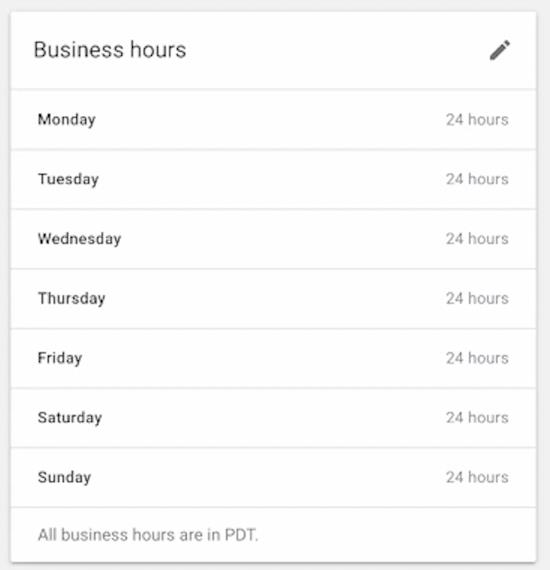
Business Hours
Within your Google Local Service Ads (LSA) profile, business hours specifically represent the timeframe during which a Customer Service Representative (CSR) is available to answer phone calls related to LSA leads. This does not necessarily reflect your overall business operation hours.
Maintaining accurate and up-to-date business hours within your LSA profile is crucial for several reasons:
● Campaign Performance: Google prioritizes sending leads to businesses demonstrably capable of handling them. Inaccurate business hours can hinder lead generation.
● Customer Satisfaction: Potential customers rely on the advertised business hours to determine call timing. Inaccurate information can lead to missed opportunities and negative customer experiences.
● Data Integrity: Maintaining consistent information across your LSA profile, including business hours, ensures Google's algorithm accurately interprets your service availability.
Recommendations
● Configure Precisely: Set your LSA business hours to reflect the exact timeframe when a CSR is readily available to answer calls from potential LSA leads.
● Prioritize Availability: Ensure dedicated CSR coverage during peak call volume times to maximize lead conversion.
Consequences of Inaccuracy
● Reduced Lead Generation: If Google identifies discrepancies between advertised and actual availability, you might receive fewer leads.
● Negative Impact on Campaign Performance: Inaccurate representation can negatively impact overall campaign performance.
Maintaining precise and accurate business hours within your LSA profile demonstrates professionalism and commitment to customer service. This, in turn, plays a significant role in optimizing campaign performance and maximizing positive customer interactions.
Existing LSA Accounts
For existing LSA accounts seeking optimization, the initial step involves reviewing the
"Leads" tab within the LSA dashboard.
LSA Lead Management and Optimization
Consistent and accurate lead marking within the LSA dashboard is crucial for campaign optimization and maximizing return on investment.
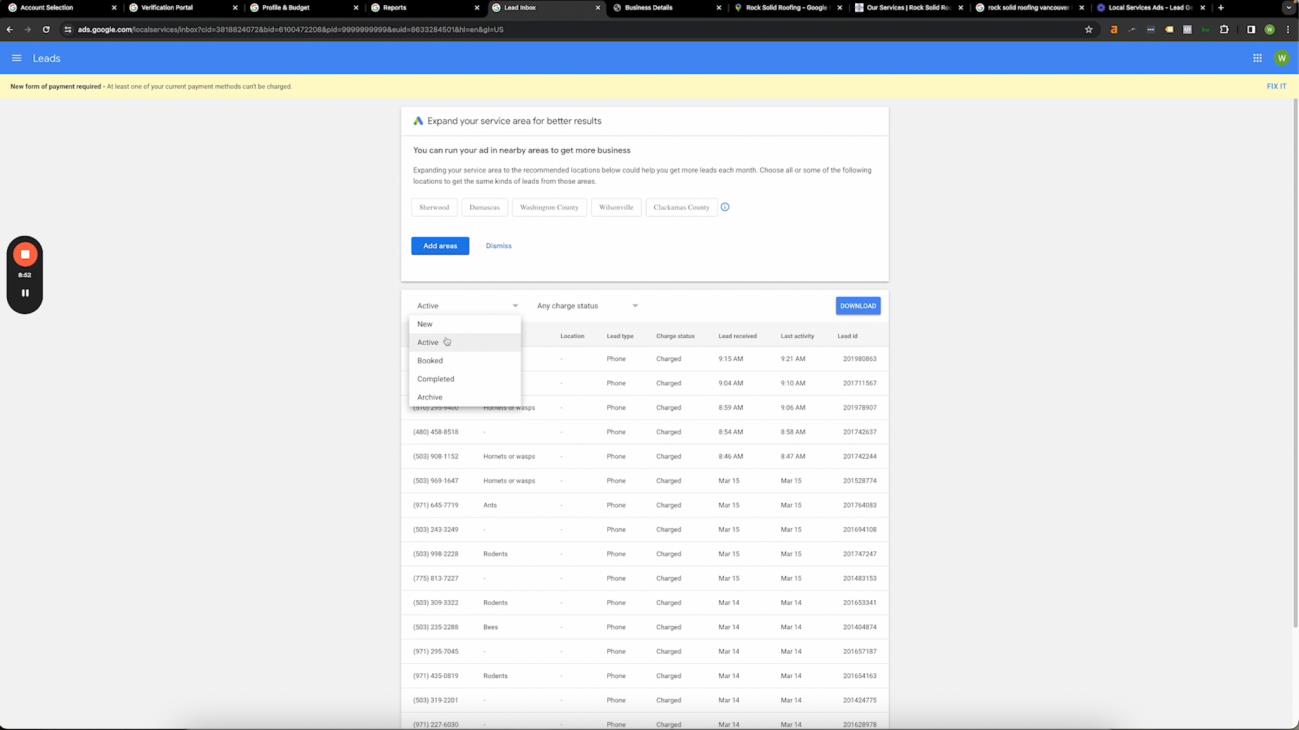
Prioritizing "New" and "Active" Leads
Focus on reviewing and marking leads within the "New" and "Active" categories. These categories often accumulate unmarked leads, leading to potential confusion regarding campaign performance.
Marking Lead Disposition
Accurately mark each lead to reflect its final disposition. Here are the recommended options:
● Booked: Select this option if the lead resulted in a booked job, even if it was a free quote. Demonstrating a high booking rate to Google can positively impact campaign performance.
● Completed: Choose this option for leads where the service was successfully completed.
● Archived: Utilize this option for leads that did not convert into a job but do not qualify for a dispute (e.g., inquired about a service not offered).
● Disputed: Select this option for leads that fall outside your service parameters, or where there was a legitimate reason why you couldn't service the customer.
Effective LSA lead management requires consistent marking and categorization. Prioritize reviewing "New" and "Active" leads, and accurately reflect the outcome of each lead interaction through the available disposition options. This ensures valuable campaign data for performance optimization and demonstrates a commitment to Google's lead management system.
Reports
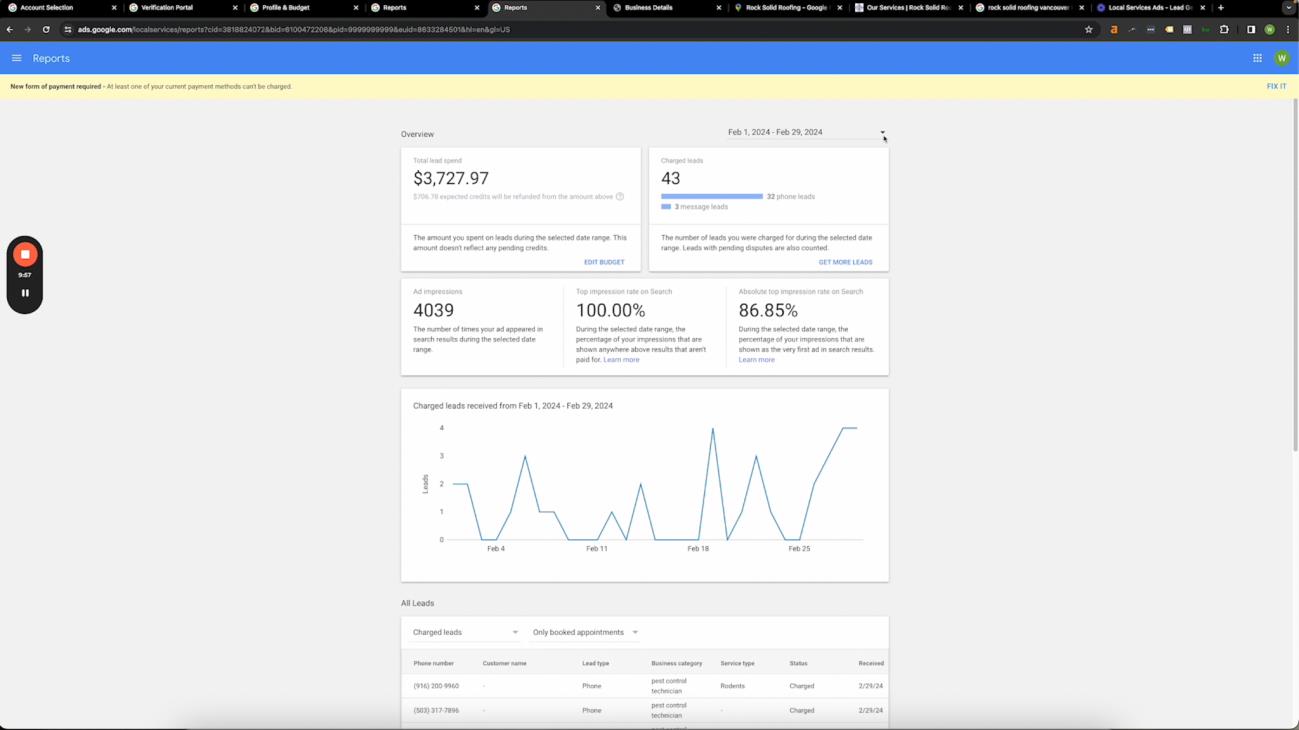
The "Reports" tab within your Google Local Service Ads (LSA) dashboard provides valuable insights into campaign performance. Here's a breakdown of key functionalities:
● Lead Generation Tracking: Monitor the volume of leads generated through your LSA campaign over time.
● Budget Monitoring: Track your weekly LSA campaign expenditure.
The true value of the "Reports'' tab lies in leveraging historical data for campaign optimization.
Once a sufficient time frame of data has accumulated (typically several weeks), you can perform comparative analyses such as:
● Month-over-Month Performance: Compare lead generation and budget expenditure between consecutive months to identify trends and areas for potential improvement.
● Week-over-Week Analysis: Analyze lead volume and budget utilization on a weekly basis for a more granular view of campaign performance.
This SOP recommends focusing on the "Last Week's Spend" metric within the "Reports" tab.
Utilize this data point to ensure your weekly budget remains consistently set at three times your total lead spend from the previous week. This approach optimizes LSA campaign performance by:
● Maximizing Lead Generation: A higher budget signals to Google your willingness to receive more leads.
● Maintaining Control: Regular budget adjustments based on the previous week's spend ensure you don't overspend.
Reviews
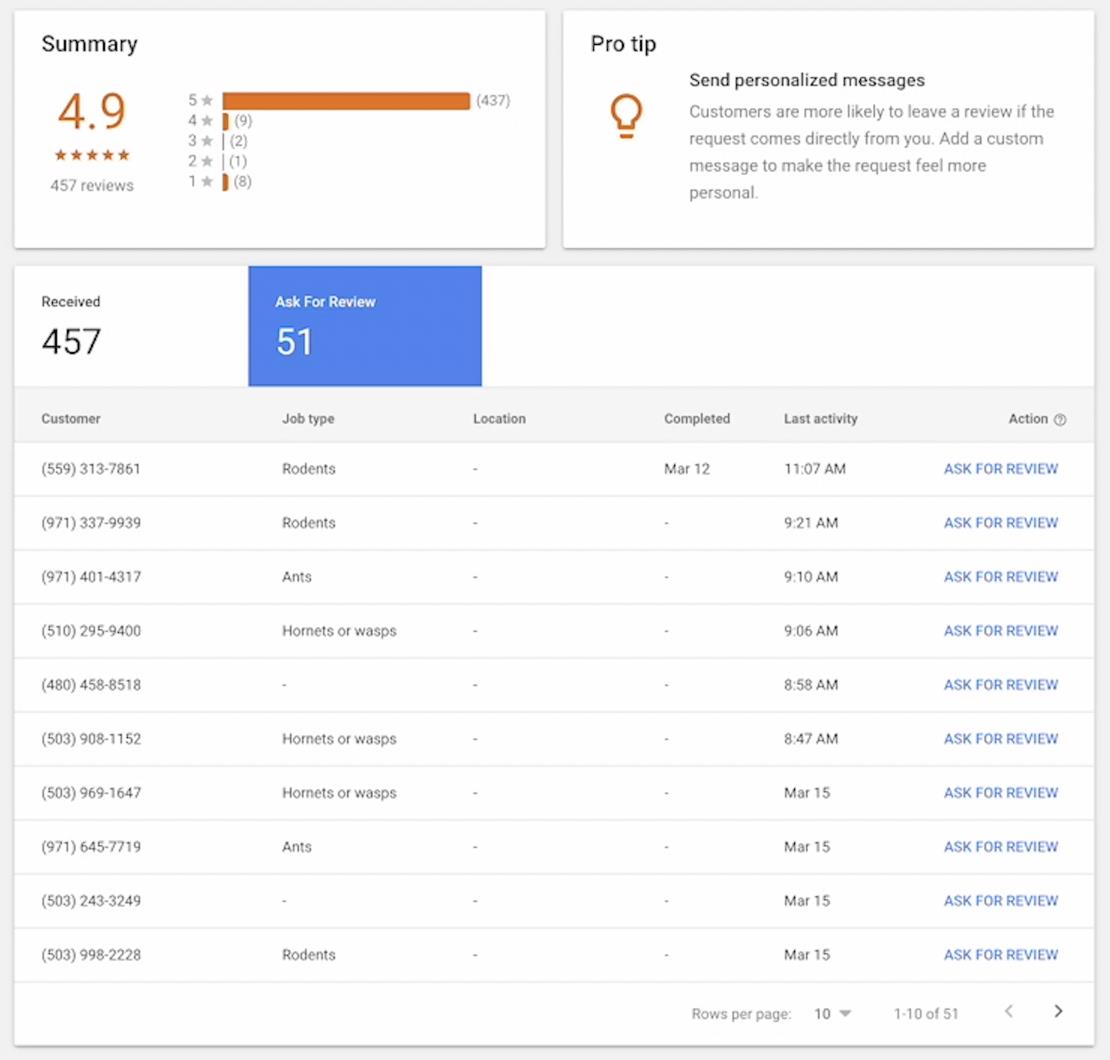
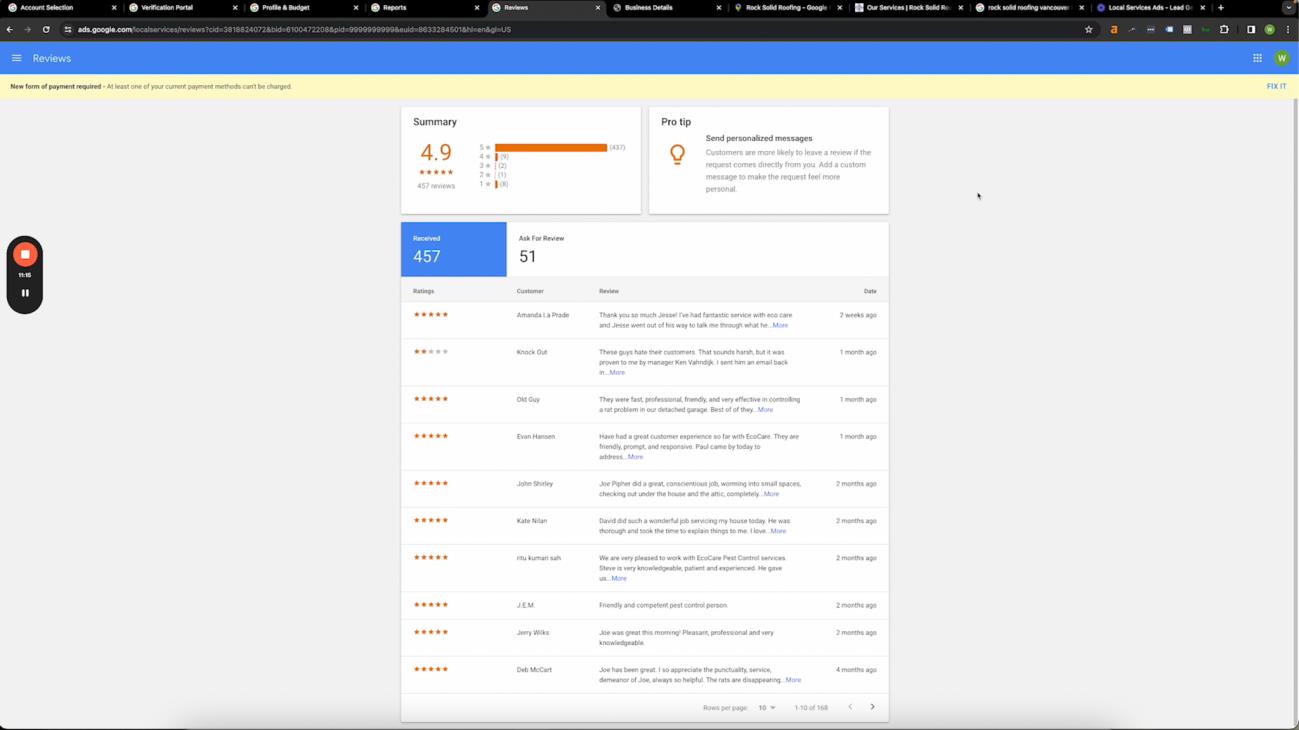
Positive Google reviews significantly impact the visibility and credibility of your Google Local Service Ads (LSA) profile. While anyone can leave a standard Google review, LSA offers a unique opportunity to acquire highly valuable "Google Verified Reviews."
Customers who booked a service through your LSA campaign and had the job completed are eligible to leave a Google Verified Review. This review carries significant weight due to its direct connection to a verified LSA transaction.
Standard Google reviews can be manipulated through unethical practices, while LSA verified reviews provide a reliable indicator of customer satisfaction.
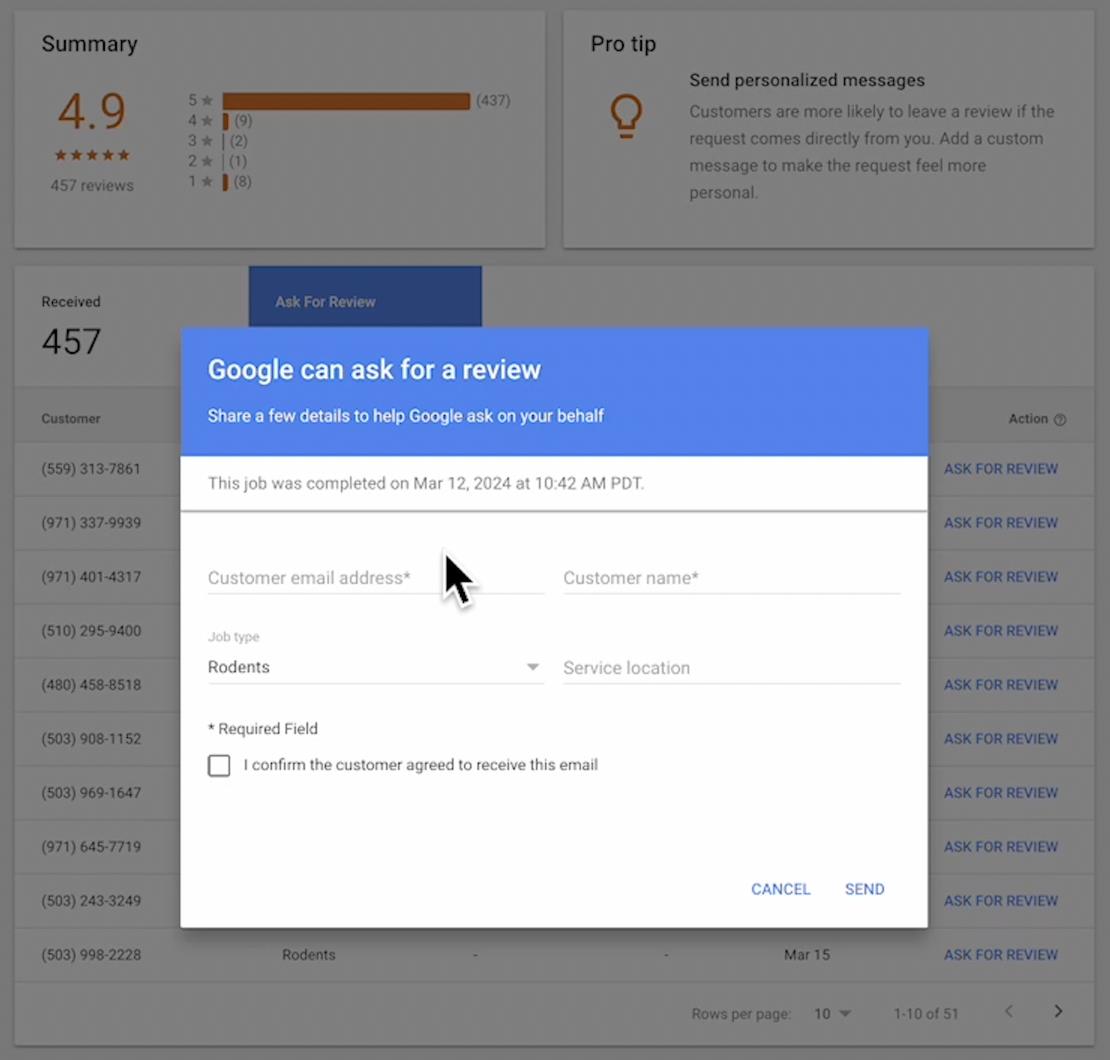
The LSA dashboard provides a dedicated "Reviews" tab with an "Ask for Review" function.
Here's how to utilize it effectively:
● Identify Eligible Customers: Navigate to the "Reviews" tab and identify customers who qualify for a Google Verified Review based on completed LSA bookings.
● Requesting Reviews: Utilize the "Ask for Review" function associated with each eligible customer. This sends a personalized request encouraging them to leave a Google Verified Review through a secure link.
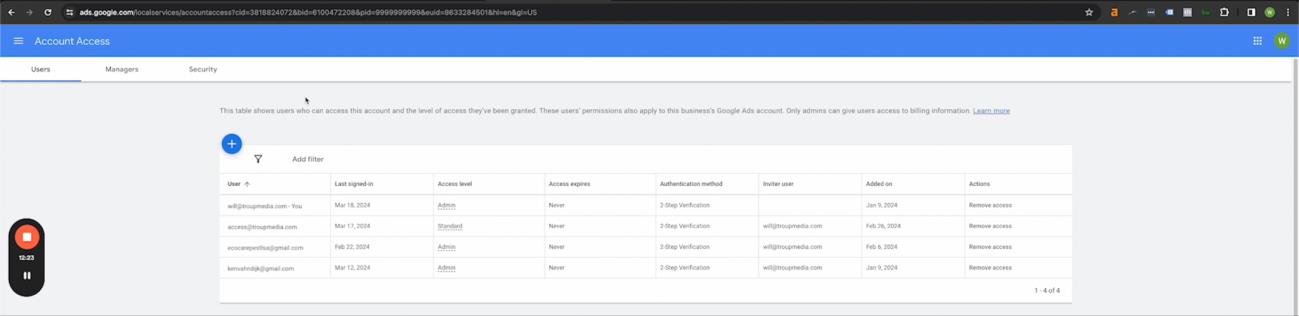
Account Access
The Google Local Service Ads (LSA) platform provides an "Account Access" page for managing user permissions within your LSA campaign.
Adding New Users
This section outlines the process for granting access to the LSA dashboard to additional users:
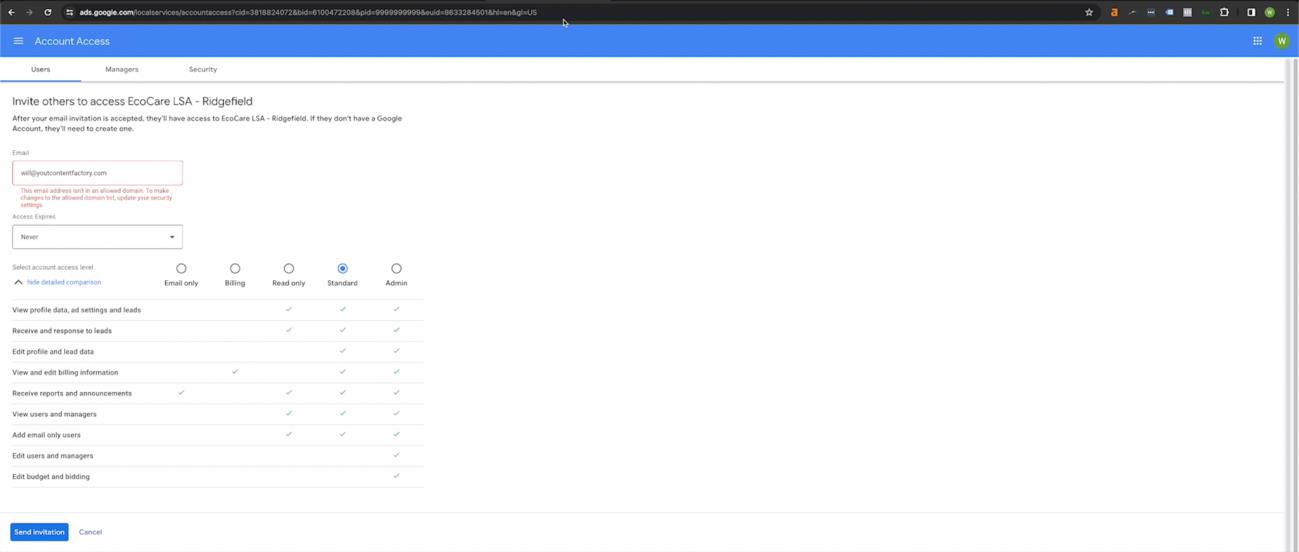
● Navigate to Account Access: Locate the "Account Access" section within your LSA dashboard.
● User Invitation: The platform allows you to invite new users by entering their email addresses and assigning specific permission levels.
Permission Levels
Carefully consider the appropriate permission level for each user you invite:
● Full Access: Grants complete control over all aspects of the LSA campaign, including budget management, settings modifications, and lead management.
● Limited Access: Provides restricted access to specific functionalities within the LSA dashboard, tailored to their designated role (e.g., viewing reports, managing leads).
Strategic user management is crucial for maintaining campaign security and accountability.
Assigning appropriate permission levels ensures that users can only access functionalities relevant to their responsibilities.
For troubleshooting purposes, it's essential to note that creating a Google Local Service Ads (LSA) campaign automatically generates a corresponding Google Ads account. To access campaign data or address certain issues, ensure you're logged into the original email address used to establish the LSA account. This ensures you have the necessary permissions to manage your LSA campaign within the associated Google Ads platform.
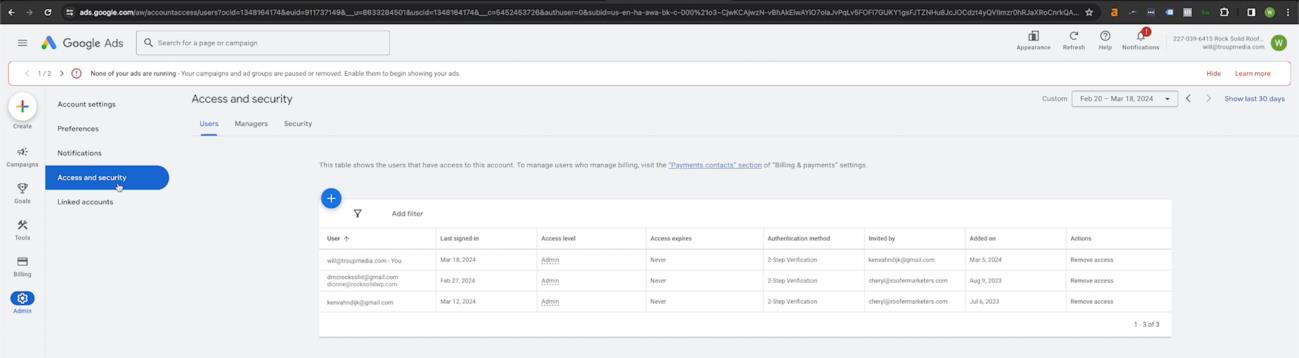
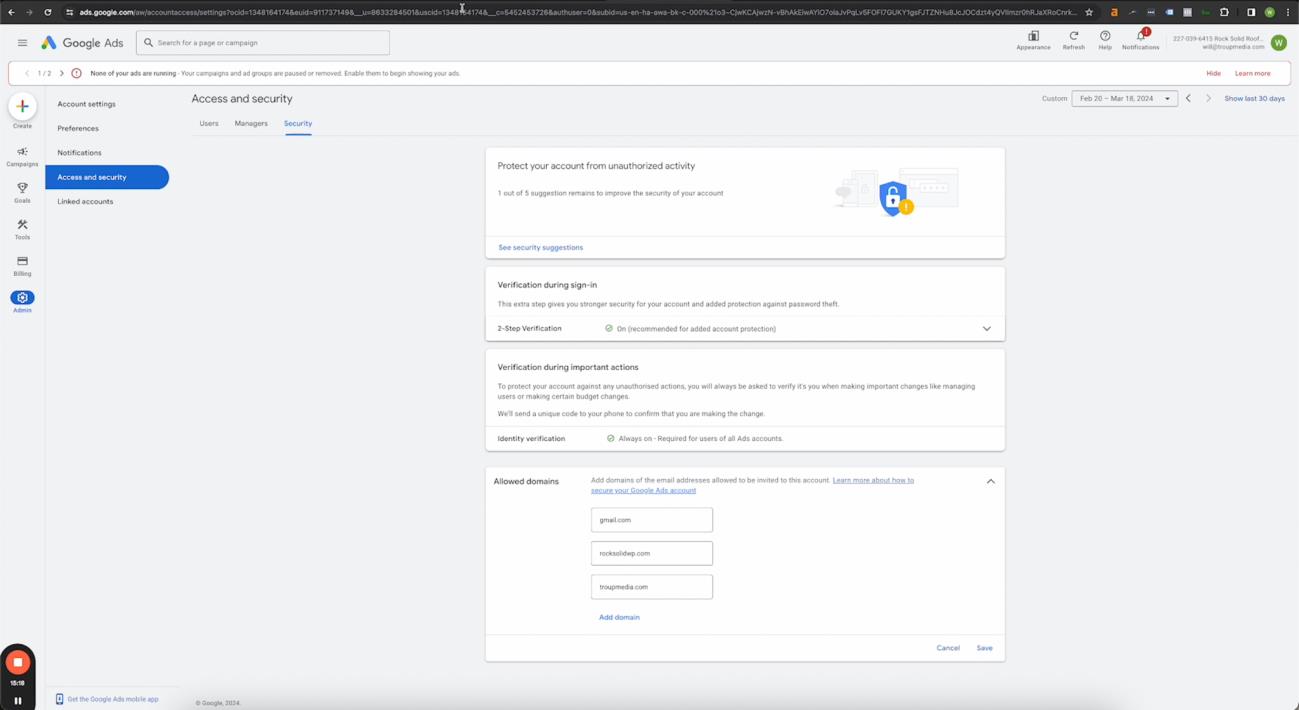
In situations where user access issues arise within your LSA campaign, navigate to the Security tab on the right. Add the part of your email that is after the @.
In the Allowed Domains area, click “Add domain” and now this will be an allowed domain, and then you'll be able to add it in the local service ads account.
Notifications
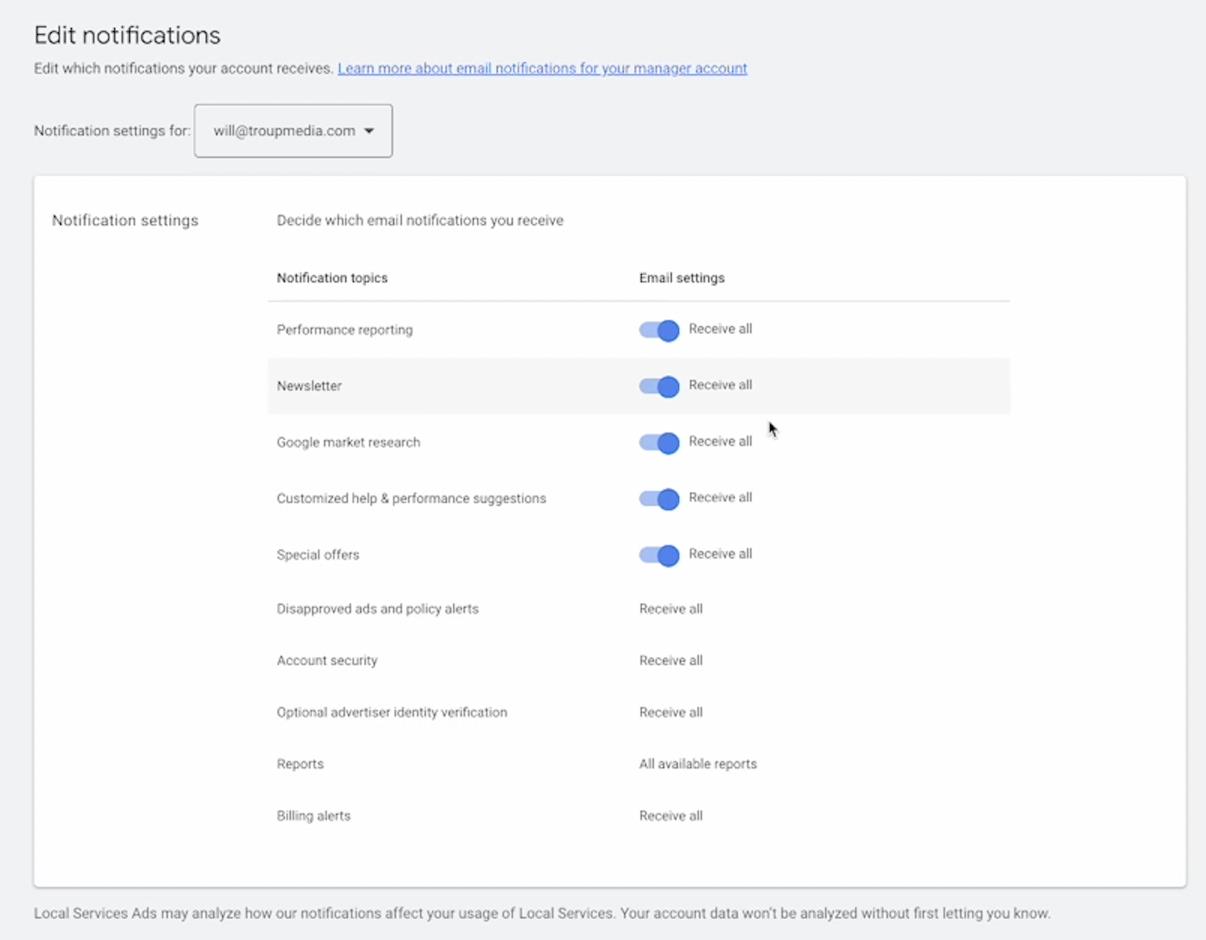
The Google Ads platform allows you to customize notification settings related to your LSA campaign performance. These alerts can provide valuable insights and ensure you stay informed about campaign activity.
Configuring Notification Preferences
● Access the settings menu within your Google Ads account.
● Locate the "Notifications" section.
● You can choose to receive various alerts, including:
○ Lead updates (e.g., new leads, booked appointments)
○ Performance reports
○ Budget alerts
For Agencies: If you manage LSA campaigns for clients, consider enabling all notification options to ensure you receive comprehensive campaign data and can provide detailed reports.
For Internal Teams: Internal LSA management teams can tailor notification preferences based on individual roles and responsibilities.
Customizing your LSA notification settings allows you to stay informed about campaign performance and make data-driven decisions for optimization. Regular reporting and communication are crucial for successful LSA campaign management, especially when working with external agencies.
Local Service Ads Optimization Checklist
● Confirm Eligibility: Check if your business is eligible for LSA and the Google Guaranteed Badge.
● Sign Up for LSA Account: Go to ads.google.com/localservices/signup and complete the sign-up process.
● Provide Business Information: Enter accurate business details, including name, phone number, and address.
● Complete Business Verification: Submit necessary documents for license verification and proof of insurance.
● Background Check: Ensure all customer-facing employees undergo a background check through the platform.
2. LSA Profile Setup
● Set Up Your Profile: Fill in all required fields in your LSA profile, including business bio, service types, and service areas.
● Select a Phone Number: Choose a trackable phone number for your LSA ads to monitor call performance.
● Upload High-Quality Photos: Add clear and professional images, including logos, company vehicles, and project photos.
● Define Service Areas: Specify the geographic areas you want to serve and exclude any areas you don’t cover.
● Set Accurate Business Hours: Ensure your hours of operation reflect when a CSR is available to answer LSA-related calls.
3. Budget and Bidding
● Set Your Budget: Determine a weekly budget that aligns with your lead generation goals and available resources.
● Choose a Bidding Strategy: Select either ‘Maximize Leads’ or manual bidding based on your business needs and experience level.
● Monitor Budget Utilization: Regularly review your spending and adjust your budget as needed to optimize performance.
4. Lead Management
● Review Incoming Leads: Check the ‘Leads’ section of your LSA dashboard regularly to monitor incoming calls and messages.
● Mark Leads Appropriately: Classify each lead as ‘Booked,’ ‘Archived,’ or ‘Disputed’
based on the outcome of the interaction.
● Dispute Invalid Leads: Follow the process to dispute leads that are irrelevant, out-of-area, or spam.
5. Optimization and Reporting
● Monitor Campaign Performance: Use the ‘Reports’ tab to track lead generation, budget spending, and other key metrics.
● Adjust Service Areas and Job Types: Modify your service areas and job types based on lead performance and business needs.
● Request Reviews: Use the ‘Ask for Review’ function to encourage satisfied customers to leave Google Verified Reviews.
6. Account Management
● Manage User Access: Add or remove users and set appropriate permission levels for team members accessing the LSA dashboard.
● Configure Notifications: Set up email alerts to stay informed about new leads, budget usage, and performance updates.
7. Ongoing Maintenance
● Regularly Update Profile: Keep your business information, service areas, job types, and photos up-to-date.
● Continue Lead Marking: Consistently mark leads and review performance data to refine your strategy.
● Stay Informed: Keep up with any changes to LSA policies or features to ensure your account remains compliant and optimized.
You may also like...
-

How to Create Personal Brand Entities Advertising by Will TroupHow to Create Personal Brand Entities
Reads:
100Pages:
73Published:
Dec 2023This book will teach you how to create personal brand entities that strengthen your SEO and get you 1 step closer to unlocking your Google knowledge panel!
Formats: PDF, Epub, Kindle, TXT
-

Master Youtube Influence Advertising by Vivek SinghMaster Youtube Influence
Reads:
342Published:
Nov 2022Master YouTube Influence is a new powerful eBook that reveals the money-making possibilities of becoming a YouTube influencer. Readers of the eBook will learn...
Formats: PDF, Epub, Kindle, TXT
-

Google Ads Tutorial - How to Make Profitable Google Search Ads - Download Free Ebook Advertising by Digipreneur3Google Ads Tutorial - How to Make Profitable Google Search Ads - Download Free Ebook
Reads:
354Published:
Oct 2022Billions of people are searching for something by typing keywords on Google. From simple things to finding the need for certain products and services.Imagine ...
Formats: PDF, Epub, Kindle, TXT
-

PAY PER VIEW MARKETING SIMPLIFIED! Advertising by Rodney PrattPAY PER VIEW MARKETING SIMPLIFIED!
Reads:
129Pages:
21Published:
Mar 2022Everything you need to know about PPV advertising!Inside this eBook, you will discover the topics about familiarizingyourself with the PPV target audience, wh...
Formats: PDF, Epub, Kindle, TXT